Talk For Me - Text to Speech
Darrin Altman

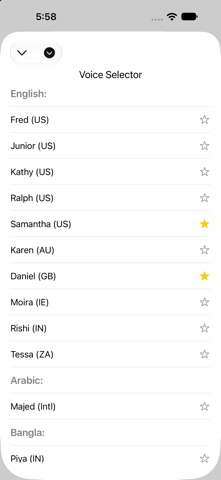
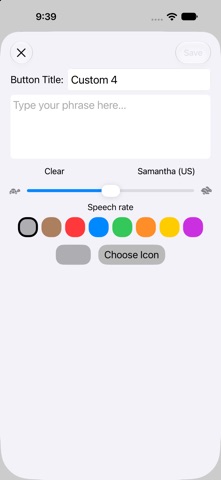
Your voice deserves to be heard clearly and effortlessly. Built from the ground up by a developer who lost the ability to speak, Talk For Me is engineered with a deep, personal understanding of what truly matters when connecting with others. Whether you are navigating a health issue or simply need a daily tool to assist with communication, Talk For Me bridges the gap. KEY FEATURES: • Speech to Call: Seamlessly sends your text-to-speech audio directly into phone calls, FaceTime, Zoom and Google Meet. • Full Dwell-Compatibility: Re-engineered from the ground up to be 100% navigable via eye-tracking and head-tracking. • Core Phrase Pack Expansion: A dedicated Library category containing over 2,000 ready-to-use phrases. • Siri Shortcuts Integration: Trigger your most frequently used everyday phrases directly through Siri without even opening the app. • Personal Voice Support (iOS 17+): Create a digital copy of your own voice and use it within the app. • Visual "Karaoke" Tracking: See exactly what is being spoken in real-time. Words are highlighted as they are said. • Rebuilt Speech Engine: Combine sentences, questions, exclamations, and ellipses (...) in one paragraph and it will all be spoken naturally with human-like emphasis. • Smarter Number Pronunciation: No awkward commas needed in long sequences like phone numbers, zip codes, or IDs. Just type the numbers naturally, and the voice engine will automatically insert human-sounding pauses! • Customizable Quick Buttons: Store your most common phrases in 12 main buttons, or swipe up to access four additional pages. • Favorite Voices: Switch to your favorite voices in an instant. • Phrase History: Saves your last 50 spoken phrases for easy access. • Hardware Keyboard Support: Magic Keyboard or external BT keyboard users can utilize native shortcuts (Cmd + F, Cmd + 1, etc.) without touching the screen. • Library Database: Save unlimited phrases or partial sentences. • Custom Library Categories: Filter your phrases using custom category chips and easily rename up to four of them in Data & Settings. • iCloud Sync & Restore: Upload your custom buttons, library phrases, and settings to iCloud. Download them instantly to a new iPhone or iPad to keep your devices perfectly in sync. • Local Backup Snapshots: Create instant local backups of your setup. • Data Control Center: Easily manage your Main Text Box Speech Rate, Local Backups, iCloud Sync, Appearance, Library Categories and Custom Button Page Titles. • Offline & Private: Works completely offline. No ads, no tracking. Internet is only required when you choose to sync with iCloud. ADDITIONAL TOOLS: • Alternate Speech Rate Slider: Visualize and adjust the speech rate directly from the Voice Selector button. • Secure Privacy Wipe: Tap the Eraser symbol, shake your device (or use a two-finger tap inside the main text window) to permanently wipe the text. • Seamless Audio Ducking: The voice engine will automatically lower your background media volume while your phrase is spoken. • Library Search: Find your phrases lightning fast with the search field in the library. SUPPORTED LANGUAGES: • Any Voice, Any Language: Talk For Me now fully integrates with your device's native speech engine. We support over 60 languages and regional dialects—if a voice is available in your Apple device settings, it is instantly available in the app. • Personal Voice Ready: Seamlessly communicate using your own custom-created Personal Voice. A NOTE ON VOICES: Go to your iPhone Settings > Accessibility > Read & Speak > Voices to download high-quality voices. SUPPORT: User Manual available at MobileTouchTech.com/TalkForMe-manual Questions? I am an independent developer dedicated to this community. If you'd like to get in touch, report an issue, or just connect, please visit https://mobiletouchtech.com/contact or email me directly at support@talkfor.me
Screenshots