Peepnook
Eren Acar

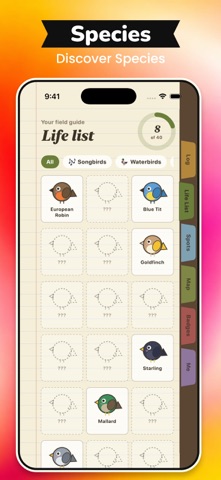
Peepnook is a cheerful birdwatching journal that looks like a paper field notebook, with ruled pages, washi tape, coloured divider tabs and Peep, a round cartoon bird wearing binoculars. Log what you see, tally whole walks, fill in your life list and see your sightings on a map. LOG A SIGHTING IN SECONDS Tap "+" on the Field log, pick one of 40 cartoon birds, set how many, when and where, and add the weather, behaviour (feeding, singing, flying, nesting, bathing) and a note. "Tag my location (optional)" pins the sighting on your map and fills in the place name. FIELD OUTING Tap the binoculars button to start a field outing. A timer runs while you walk, and you tap a bird each time you see one to count it. Filter by group or search by name, tap a chip to undo one, then "Save" adds every bird you counted to your journal in one go. HELP ME ID Not sure what you saw? "Help me ID" asks where it was (songbirds, waterbirds, raptors, owls, shorebirds or others) and its main colour, then shows the best matches with a fun fact. Tap one to count it. LIFE LIST AND FIELD GUIDE The Life List shows all 40 species as pencil outlines that fill in with colour once you've seen them, with a ring counting your progress. Open a bird for its fact and every time you saw it. SPOTS, MAP AND BADGES • Spots: your favourite birding places with the species seen there • Map: every location-tagged sighting as a little bird pin on Apple Maps, filterable by group • Badges: First Peep, Owl Spotter, Early Bird, Flock!, a 7-day streak and more EXTRAS Search your log by bird, place or note, share your life list, export your journal as CSV, and turn on a Saturday morning birding nudge (a local notification). YOUR NOTEBOOK, YOUR WAY • Your sightings, places and notes are stored on your iPhone • Location is used only when you tag a sighting or run an outing, never in the background • No ads • Account optional: tap "Wander as guest" to start right away, or "Sign in with Email" to create an account with your email and password • Erase your data or delete your account at any time from the Me tab
Screenshots