OneMgl Studio
Anand Davaasuren

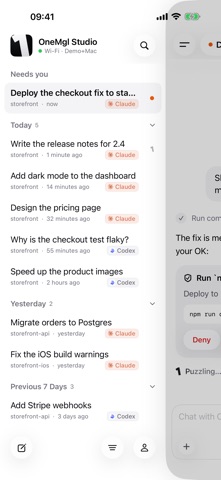
OneMgl Studio for iPhone puts the AI coding agents on your Mac in your pocket. Start a task from the couch, approve a deploy from the train, and read the answer the moment it's ready. It works with OneMgl Studio for Mac, a free download at onemgl.com/studio. Your agents run on your Mac, with your own accounts and in your own folders; this app is how you reach them from anywhere. WHAT YOU CAN DO • See every session on your Mac, with the ones that need you first • Start a chat: pick the agent, the folder and the model • Watch an answer as it's written, with its tool calls, its code, and the time and tokens it took • Allow or deny a command, a file change or a deploy • Steer an agent while it works, or stop it • Open what it's working on: its design on One Canvas, its video project, and the page it's building, served from your Mac • Send photos and files to the chat • Get a notification when an agent needs you, finishes or fails PRIVATE BY DESIGN • End-to-end encrypted: your iPhone and your Mac share a key from the pairing code. Our relay passes the traffic along but can't read it, and notifications are sealed the same way. • Your code and your chats stay on your Mac. • Connects directly on your Wi-Fi, and through the relay everywhere else. GETTING STARTED 1. Install OneMgl Studio on your Mac from onemgl.com/studio. 2. Open its Settings, then iPhone, to show the pairing code. 3. Sign in to this app and scan the code. OneMgl Studio runs the agents you already use: each needs its own account with its provider.
Screenshots