Reserve - Budget Planner
Kapya

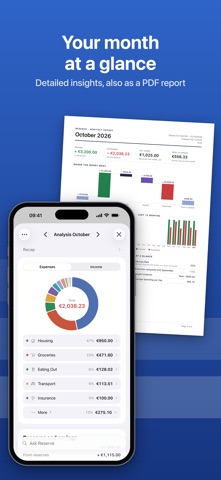
With Reserve, you know every month how much money you can truly spend without worry. Free, Pro is a one-time purchase, no subscription. HOW IT WORKS At the start of the month, you first set aside what you know is coming: - fixed costs you have to pay, like rent, insurance or subscriptions - money for things coming up later, like holidays, gifts or the next car repair - your monthly savings for the long run, like ETFs or your emergency fund Whatever is left shows up as one number: Free to Spend. This money is all yours. Spend it on anything you like, because your fixed costs, upcoming expenses and savings are already taken care of. Still money left at the end of the month? Treat yourself to a nice dinner or a spontaneous trip, guilt-free. MONTH AND DAILY BUDGET Add expenses and income in seconds. The overview shows what comes in, what goes out and what is still free. Tap Free to Spend to see your daily budget: how much you can spend each day until the end of the month. ADD AND ASK, ALSO WITH SIRI Just type or say what you spent, like “45 groceries yesterday”. Reserve picks out the amount, store, category and date and suggests the entry. You just confirm. It works in the app, with the “Quick add” widget and with Siri: “Hey Siri, book with Reserve”. Ask Reserve, like “How much did I spend on clothes this year?”, and get the exact number. Also via Siri: “Hey Siri, ask Reserve”. Visual Intelligence: point the camera at a receipt and Reserve suggests the entry. With a price tag, you see what’s left to spend afterwards. All free. Ask Reserve and Visual Intelligence run with Apple Intelligence right on your iPhone. RESERVES WITH SAVINGS GOALS A reserve is a pot for one specific thing. You can give it a fixed monthly amount, and it fills up on its own. At the start of the month, Reserve suggests all transfers and you just confirm. When a scheduled payment is due, like car insurance, it is paid from its reserve. With a savings goal, like €2,500 for your holiday, you always see how much is still missing. WEALTH Keep track of accounts, ETFs or precious metals. With fixed monthly savings, your wealth grows every month before you even think about spending. YOUR MONTH AT A GLANCE The analysis shows where your money goes: categories, share of income and your last months compared. With Pro, you get every month as a clear PDF report, ready to share or print. If you like, a recap sums up your month in words. NOTIFICATIONS If you like, Reserve reminds you in the evening to add your spending, tells you when a scheduled payment was booked and lets you know when you are almost out of free money. In Partner Mode, you also see when your partner adds something. SWITCHING IS EASY Already using another finance app? Bring over your past income and expenses as a CSV file, also from your bank’s export. Reserve detects the columns and matches the categories. Free. PLAN TOGETHER Plan as a couple. In Partner Mode you both see the same month, the same reserves and the same wealth, and you can both add entries. Free. WIDGETS AND LOCK SCREEN See your free-to-spend money on the Home Screen and the Lock Screen. You can also add new entries from Control Center with one tap. YOUR DATA STAYS WITH YOU No bank access, no account, no third-party server, no tracking. Everything stays on your iPhone. Lock Reserve with Face ID if you like. FREE AND PRO The free version is enough to get started. Reserve Pro is a one-time purchase, no subscription, and removes all limits: - unlimited reserves, scheduled payments and monthly savings - monthly report as PDF - iCloud sync across your devices - export as a backup or as a spreadsheet (CSV) - no more Pro notices Questions or ideas? Write to info@kapya.org.
Screenshots