Zettelwerk
eventum-pharma GmbH

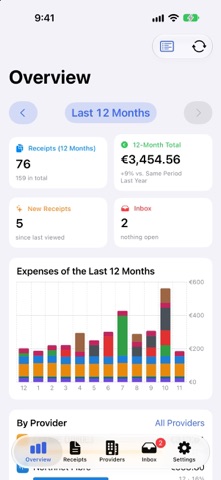
Zettelwerk collects your invoices and receipts – automatically from your email inbox and from customer portals, with the camera scanner or via “Share” from any app. Everything lands neatly named and sorted in one place that you choose. INVOICES THAT FETCH THEMSELVES • Email fetching: define for each provider which emails contain invoices – with a clear rule builder (sender, subject, attachment; all or any of the conditions). • Learn from sample emails: Zettelwerk suggests the rule and shows live which emails match. • Customer portals: Zettelwerk signs in to the provider with your credentials and downloads new invoices. An AI is strongly recommended for this – it sets up fetching for the specific portal. • Test and fetch each provider individually. SCAN, SHARE, IMPORT • Document scanner with on-device text recognition • “Copy to Zettelwerk Inbox” from Mail, Safari, Files or Photos – receipts you already have are recognised instantly • PDFs, photos and e-invoices (XRechnung, ZUGFeRD) – e-invoices are shown in readable form ORDER WITHOUT EFFORT • Inbox for quickly assigning new receipts • Provider view: all invoices of a provider, by year with totals • Overview by year and month, search across all receipts • Edit receipts later – with preview and highlighted matches • Foreign currencies are converted to euros using the European Central Bank reference rate FOR TAXES AND EXPENSES • Collections: import a bank or credit card statement as a PDF – Zettelwerk matches each transaction with the right receipt and shows what is still missing • Export as a ZIP or folder with numbered receipts and a report (text and CSV) – to share via Mail or AirDrop or for your tax advisor • Business meal receipts with signature and self-issued receipts for expenses without a receipt (created in German, as required by German tax law) INCOME AND BALANCE (OPTIONAL) • Mark receipts as income – one by one or for all new receipts from an income source • Overview with expenses, income and balance: totals, surplus per month, income by source • The AI recognises invoices you issued yourself by your name and suggests “Income” • Collections match credits on your bank statement with income • Switched off, everything stays as before YOUR DATA STAYS WITH YOU • No account, no ads, no tracking • Storage of your choice: on the device only, iCloud Drive or WebDAV (e.g. Nextcloud) – iPhone and iPad stay in sync • When you change the storage location, Zettelwerk takes your receipts along • Passwords are stored only in your device’s Keychain AI – STRONGLY RECOMMENDED FOR CUSTOMER PORTALS An AI of your choice reads new receipts, checks details and sets up fetching from customer portals – for portals it is strongly recommended. You use your own API key (e.g. Claude, OpenAI, Gemini, Mistral) or your own server. Only text is sent, never passwords. Scanning, sharing, email fetching, collections and export also work without AI.
Screenshots