Caprock
CYBRIX

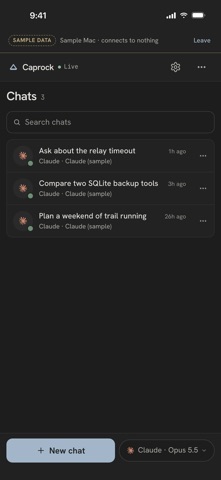
Caprock for iPhone is the remote for Caprock on your Mac or PC. Caprock watches every coding-agent session on your computer; this app puts those sessions in your pocket, so an agent that is waiting for you does not wait until you are back at the desk. WHAT YOU CAN DO - See which sessions need you: a permission prompt, a question, a plan to approve. - Approve or deny a command, answer a question, or reply in the chat. - Start a new chat or session on your computer and follow it as it works. - Read what the agent wrote, with its tool calls folded away. - Check your plan limits and how close you are to them. - Dictate instead of typing. Speech is recognised on the iPhone itself; when a language cannot be recognised on the device, nothing is heard or sent. PAIRING On your computer, open Caprock, go to Settings, Use on your phone, Connect a phone, and scan the code it shows with this app. You can also paste the pairing link instead. One computer, one scan. PRIVATE BY DESIGN - Your phone talks only to your own computer. It reaches it on Wi-Fi or mobile data through Caprock's relay, which forwards end-to-end encrypted traffic it cannot read and stores nothing. - The pairing keys stay in this iPhone's Keychain, on this device only. - An optional Face ID lock covers the app when you come back to it. - No account, no tracking, no ads, no analytics in the app. TRY IT WITHOUT A COMPUTER Tap "Try it without a Mac" on the first screen to use the whole app on sample data. The demo connects to nothing and is marked as sample data on every screen. WHAT YOU NEED Caprock running on a Mac, Windows or Linux computer (free, open source, from caprock.dev). It works with Claude Code, Codex, OpenCode, Gemini CLI and the other agents Caprock shows on your computer. The app is free and sells nothing. Features your computer's Caprock has turned on work here too.
Screenshots