ReplayMark
Ruifeng Zhang

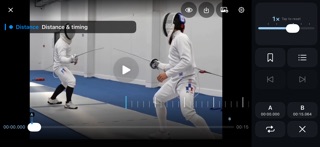
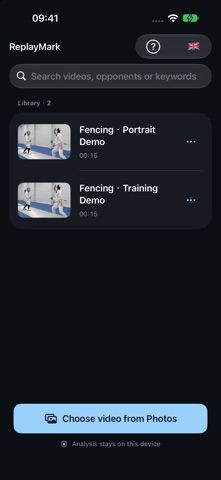
ReplayMark helps athletes and coaches review training and competition videos, starting with fencing. Choose a video from Photos and examine movement, distance and timing on iPhone or iPad. PRECISE PLAYBACK • Scroll the time ruler or drag the timeline to find a moment. • Adjust playback speed from 0.1× to 3×, where supported by the video. • Hold the left or right edge for frame navigation; hold the center for temporary slow playback. Release to pause. • Tap the picture to play or pause. Double-tap either side to jump backward or forward. • Reopen a video at your saved position, paused and ready to review. Start from the beginning in playback settings. FOCUS ON A CLIP • Set A and B points and loop the selected section. Points are saved per video; enable looping when you need it. • Export the A–B section at a chosen speed as a new video in Photos. • Save the current full video frame as an image in Photos. • Exports leave your original video unchanged. KEEP YOUR OBSERVATIONS • Add timestamped markers with optional titles, categories and notes. • Display marker details over the video for an adjustable duration. • Jump to the previous or next marker, or browse and edit the marker list. • Browse thumbnails, rename videos within the app and search by words in their names. YOUR VIEW, YOUR LANGUAGE • Portrait and landscape layouts with viewing and analysis modes. • Pinch to zoom, pan with two fingers and restore the full frame. • Choose English, Simplified Chinese or German within the app. • Open the question-mark guide for an offline introduction to the controls. LOCAL BY DESIGN No account is required. No advertising, tracking or analytics SDKs. Video references, markers, notes and settings stay on your device and are not uploaded to the developer. Locally available videos work offline. iCloud-only originals must first be downloaded through Apple. Photo permissions determine which videos are accessible; exports require permission to add photos or videos. ReplayMark does not record video or provide automatic movement recognition or AI analysis. Record with the Camera app or another tool and choose videos you have the right to use. Frame navigation and playback rates depend on the media.
Screenshots