Smart Scale Studio
Jesper Andersen

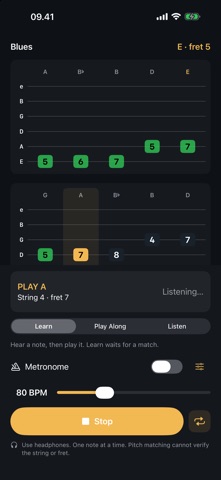
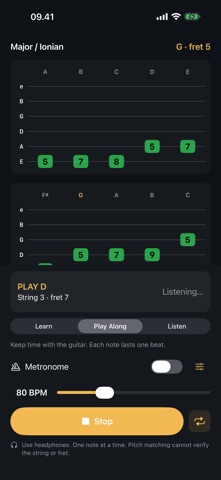
Scales don't have to be boring. Smart Scale Studio turns practising them into a little game: the app shows you the tab, plays the notes, and listens to your guitar – every note you hit turns green. THREE WAYS TO PRACTISE • Listen – hear the whole pattern first, so you know how it should sound. • Learn – the app plays a note and waits until you play it back. No rush. • Play Along – one note per beat, in time with the metronome. Can you keep up? THE SCALES YOU ACTUALLY USE Minor and major pentatonic, blues, major (Ionian), natural minor (Aeolian), Dorian, Mixolydian, harmonic minor, melodic minor, diminished and altered – in every key. FROM ONE BOX TO THE WHOLE NECK Start with one position, then link the connected shapes across a fret range of your choice. The whole-fretboard view shows where every note of the scale lives, with the roots highlighted. PRACTISE AT YOUR TEMPO Set the tempo from slow to fast, add a count-in and a metronome with an accented first beat, and repeat the exercise until it sits in your fingers. WORKS WITH YOUR SETUP Use the built-in microphone or plug in a USB audio interface. Headphones are recommended so the app's own notes don't get mistaken for yours. PRIVATE BY DESIGN No account, no ads, no tracking. Your playing is analysed live on your device and never leaves it. Good to know: the app listens to pitch, so it knows which note you played – not which string or fret you played it on.
Screenshots