Control: Kettlebell Workouts
Easy Going

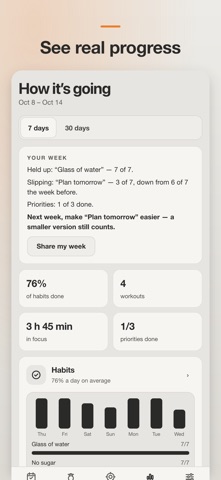
Control is a kettlebell coach and a daily dashboard in one app. KETTLEBELL TRAINING THAT KNOWS WHAT’S NEXT • 14 programs inspired by renowned kettlebell coaches — daily 100/10, press ladders, double-bell complexes, snatch intervals, five-lift strength and more • Every program says plainly what it’s based on, what it builds and what it won’t give you • Today’s workout is planned for you — sets, reps, bell and rest • Progression cues: after easy sessions the app suggests a heavier bell or the next step; after hard ones, a step back. You decide with one tap • A short fitness test finds your starting level, so you don’t start from zero • Workout mode: the current set up front, one big button • Rest timer that starts itself, works over any screen, with sound and vibration • Progress for every exercise: working weight, volume and personal records • Benchmark tests with a built-in timer: 100 swings in 5 minutes, 10 get-ups in 10, 100 snatches in 5 • Build your own program and set a rep goal — the app suggests +1 rep when it’s time • Short on time? Squeeze today’s workout into 10 or 20 minutes — the main lift stays • No kettlebell with you? The same day’s workout with bodyweight moves — for trips and vacations • Programs grouped by goal: general fitness, strength, muscle, cardio, endurance • Rest and focus timers on the lock screen and in the Dynamic Island • Apple Watch: tick off sets, see your heart rate, and the workout is saved to Health • Apple Watch complications: habits and today’s workout on your watch face RUN YOUR DAY — AND ACTUALLY FOLLOW THE PLAN • Day follows the clock: priorities and habits in the morning, calendar and next steps during the day, habits in the evening • “Now” card: the block you’re in and the next thing to do, with one tap to start focus • Reminders that follow your plan: your top three in the morning, each calendar block as it starts, close the day in the evening • Close the day: move what you didn’t finish to tomorrow or let it go on purpose • Top-3 priorities for the day — with one-tap suggestions from yesterday and your projects • Time-blocking calendar with a week view and repeating blocks — your workout shows up there too • Home-screen widget: tick off priorities without opening the app • Lock screen widgets: habits, your next priority and the workout at a glance • Habit reminders with a Done button right in the notification • Add a calendar block in one line: “Gym 6–7pm tomorrow” • Last night’s sleep from Apple Health on iPhone • Share your workout or your week as a picture • Habits with schedules, courses and no-break streaks • Focus timer with notifications • Next step for every project • Bill reminders before they’re due • Quick notes • Practices library: 21 habits and “when you’re stuck” exercises, each with the research or experience behind it SEE HOW IT’S GOING • Stats for 7 or 30 days: habits, workouts, focus, energy and priorities • A weekly review: what held up, what’s slipping, and one thing to try next week • Patterns across your days: energy after workouts, habits after short sleep, priorities on focus days PRIVATE BY DESIGN • No account, no ads • Everything stays on your phone, with an automatic safety copy included in your phone’s backup; optional sync through your own iCloud or Google Drive; one-file backup through the share sheet • Русский, English, Español, Deutsch, Português — light or dark FREE No ads, no account, no in-app purchases. Privacy Policy: https://easygoingtechnologies-png.github.io/control/privacy.html Program names are the app’s own; the original programs and their authors are credited as inspiration. Control is not affiliated with or endorsed by them.
Screenshots