Cashflow: Expense Tracker
Dawid Firuzek

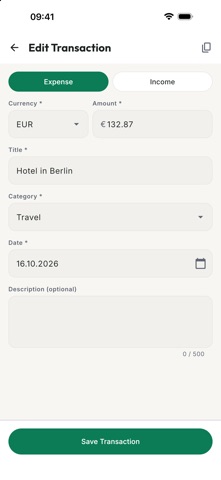
Cashflow helps you see where your money goes - simply, privately and in any currency. Write down what you earn and what you spend, and Cashflow shows your current balance and an overview of your earnings and spendings for the period you choose: today, this week, this month, this year, everything, or your own dates. WHAT YOU CAN DO • See your balance at a glance, with your earnings and spendings for any period. • Add an earning or a spending in seconds: title, category, amount, currency and date. Categories you've used before are suggested as you type. • Browse and search your full history: filter by type, category and period, sort by date or amount, and search by title, category or description. Longer periods are grouped by month, each with its own totals. • Use any currency. Each amount keeps the exchange rate of its day, so past totals never change, and all totals are shown in the display currency you pick in Settings. • Open any transaction to see its details and the exchange rate it used, add an optional description, or duplicate it. • Fix mistakes easily: edit any transaction, or delete it with a swipe and undo it if you change your mind. • Take your data with you: export your transactions to a spreadsheet file (CSV), and restore an export later. • Use it your way: works with VoiceOver and large text, in light and dark mode, in English and Polish. PRIVATE BY DESIGN • No account and no sign-up. • No ads and no tracking. • Your financial data stays on your iPhone. The only thing Cashflow downloads is the daily exchange rates (from ExchangeRate-API), and that request contains none of your data. • If you use iCloud Backup, your data is included in your iPhone's backups. Cashflow is free. Privacy policy: https://flowa.re/cashflow/privacy/ Questions or ideas: support@flowa.re
Screenshots