App Screenshot Maker: Shotform
Mir Ghulam Hyder Talpur

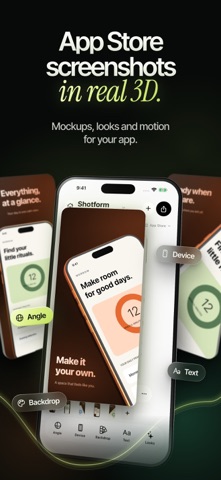
Your app deserves a better first impression. Create App Store screenshots, real 3D device mockups, and animated promo videos with Shotform. Bring your screenshots and screen recordings into a visual studio built for app developers, designers, and independent makers. Start with a coordinated template, find the right angle, and make every screen feel like part of the same launch. DESIGN A COMPLETE SCREENSHOT SET Choose a collection template and customize its headlines, colors, backgrounds, and layout. Build a consistent visual story across multiple slides, then revisit your saved project when your app changes. GIVE YOUR APP A NEW PERSPECTIVE Place your screens inside 3D phone and tablet models. Rotate, tilt, scale, and position your devices with live controls. Explore hero angles, close-ups, and multi-device compositions that bring the details of your interface into focus. MAKE THE STYLE YOURS Refine typography, device finishes, shadows, and backgrounds. Use gradients, studio looks, and continuous compositions to give your launch a distinctive visual identity. BRING YOUR MOCKUPS TO LIFE Import a screen recording or animate a still composition. Motion presets and editable keyframes help you create product demos and promo videos for your website, portfolio, and social channels. EXPORT WITH PRO Shotform Pro unlocks PNG and JPEG images, transparent-background images, and video exports. Batch-export an iPhone App Store screenshot set at 1320 × 2868 pixels, packaged in a ZIP. Your supported language versions can be included in the set. CREATE LANGUAGE VERSIONS Duplicate a collection and edit the text for another audience. On supported systems and language pairs, on-device translation can help create a starting draft. Review the wording and layout before exporting. KEEP YOUR WORK CLOSE Projects and imported media are stored on your device. No Shotform account is required. Work on iPhone, iPad, or Mac, with tools for shaping the same kind of polished presentation. CHOOSE YOUR PRO PLAN The editing tools are available without purchasing Pro. Exporting and sharing finished images, screenshot sets, and videos requires Shotform Pro. Choose a weekly or annual auto-renewing subscription, or a lifetime purchase. Subscriptions renew automatically unless canceled in your Apple Account settings at least 24 hours before the current period ends. A lifetime purchase does not renew. Restore your purchases with the same Apple Account. Terms of Use: https://www.apple.com/legal/internet-services/itunes/dev/stdeula/ Make your next launch look as considered as the app behind it. Privacy Policy: https://shotform.netlify.app/privacy/
Screenshots