Nan App
Fazloon Muhammad

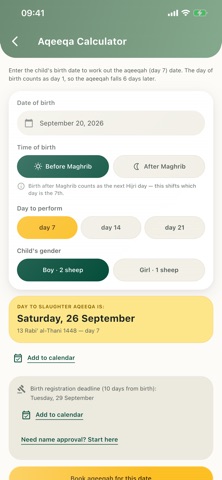
Nan App is a beautifully designed companion for naming your newborn — with more than 14,000 names, an Aqeeqah day calculator, and a simple way to get a name officially checked. NAME LIBRARY • More than 14,000 boys' and girls' names: Arabic and Islamic names alongside names from Persian, English, Kurdish and many other origins • Every name shown with its Arabic spelling, Dhivehi (Thaana) spelling and pronunciation, plus the meaning in English and Dhivehi and the language of origin where known • Names of Allah, the Prophets, the Sahaba (Companions), and other notable figures • See at a glance whether a name is on the official municipality-confirmed list • Save favourites, browse your recent searches, and get a new "Name of the Day" • Copy the name or its Arabic spelling, or share it in one tap NAME APPROVAL • Request official approval for a name directly from the app • Verify with just your phone number — no account or password needed • Track the status of your request from start to finish AQEEQAH CALCULATOR • Work out the correct day (7th, 14th or 21st) from your child's date and time of birth, accounting for births after Maghrib • See the date in both the Gregorian and Hijri calendars • Get the birth-registration deadline (10 days from birth, per Maldivian law) • Add the Aqeeqah date and registration deadline to your phone's calendar as reminders • Browse and book Aqeeqah goat and sheep packages, with photos/videos of the Aqeeqah sent to your preferred app DESIGNED FOR THE MALDIVES • Full English and Dhivehi (Thaana) language support throughout • Adjustable Hijri calendar offset to match local moon-sighting • Light, dark and system themes • No account, no sign-up — just open the app and start browsing • Your data stays yours: delete it any time from Settings Whether you're choosing a name, checking it against the official list, or planning the Aqeeqah, Nan App brings everything a new Maldivian parent needs into one simple, respectful app. Questions or feedback? Reach us anytime on WhatsApp from the Settings tab.
Screenshots