Honeyday
Missaq Ataschi

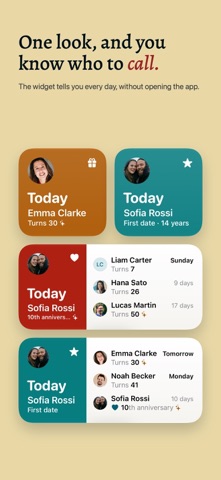
For the people and moments you love: birthdays and anniversaries from your contacts, in a widget and with reminders. iPhone, iPad, Mac. Birthdays, anniversaries and the evening you first met. Most of them are already in your contacts, and you add the rest yourself. Home Screen The widget tells you every day, without opening the app. Small, medium or large, and on the Lock Screen too. At midnight it moves on to the next day by itself. On ordinary days it stays calm. On the day itself it lights up in the colour of the occasion, and round birthdays and anniversaries get a little sparkle. Your contacts The birthdays and anniversaries in your contacts show up right away, sorted by who is next. Honeyday never changes a contact on its own. If a date is wrong, you fix it right in Honeyday on iPhone and iPad, or with one click in Contacts on the Mac, and the list follows. Days that belong to no contact you add yourself: the day you moved in together, the dog’s birthday, your first date. iPhone, iPad and Mac Honeyday is a real app on each of them, with the list and the details side by side on the iPad and the Mac. What you decide in it, like who you want to be reminded about or a note for a gift idea, syncs through your own iCloud. A reminder arrives on the day at the time you choose, and a few days before if you want time to find a present. A few more things Round numbers stand out A 30th birthday, a 50th or a 25th anniversary is marked in the list and in the widget, so you notice it early enough to plan something. Other calendars Dates in the Chinese, Hebrew or Islamic calendar land on the right day every year, converted for you. Siri and Spotlight Ask Siri when someone’s birthday is, or search for a name in Spotlight and land on their entry. A note per person For the gift idea you had in March and would otherwise forget by October. Your data stays yours What you set lives on your devices and in your own iCloud. There is no account, and the app measures nothing about how you use it. English, German, French, Italian, Spanish, Portuguese (Brazil), Japanese, Korean, Simplified Chinese and Traditional Chinese, following your system language. VoiceOver and the largest text sizes are supported. One purchase for iPhone, iPad and Mac. Runs on iOS 26, iPadOS 26 and macOS 26.
Screenshots