IsoLane: Split WAV Channels
Gobling Company

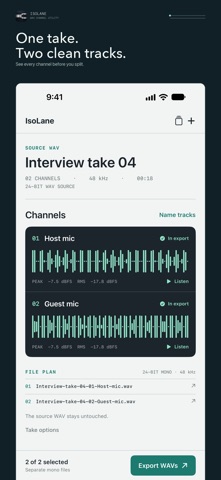
IsoLane makes separate mono WAV files from the channels inside one stereo or multichannel WAV. Import a 2–8 channel WAV from Files, inspect each lane’s waveform and peak and RMS levels, listen to a short channel preview, and choose which tracks to keep. Give tracks useful names, then export the selected lanes as individual 24-bit mono WAV files at the source sample rate. Share the finished files with an editor or save them to Files. IsoLane keeps your original WAV unchanged. Imported takes and names are saved locally so you can return to them. A synthetic sample take is available by choice if you want to try the workflow first. The app works offline with no account, subscription, ads, analytics, tracking, cloud sync, or developer-server upload. One purchase unlocks the full workflow.
Screenshots