Vaultline: Secrets Vault
Bedrock Group LLC

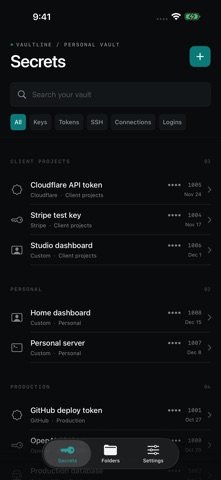
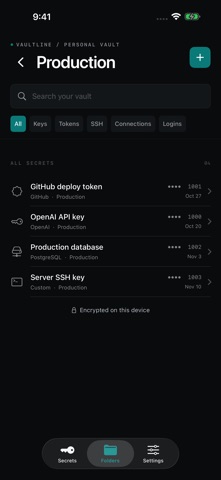
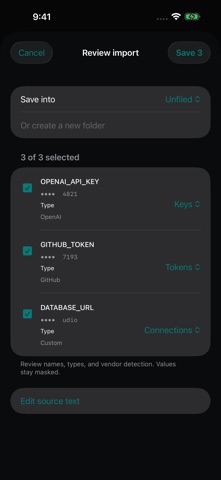
Your credentials deserve a place of their own. Vaultline keeps API keys, access tokens, SSH credentials, connection strings, and logins in an encrypted vault on your iPhone or iPad. No Vaultline account is required. KEEP YOUR WORK ORGANIZED Create folders for projects, clients, or personal tools. Search by name or vendor and filter by credential type. Add notes so you remember what each secret is for. IMPORT WITHOUT THE BUSYWORK Paste environment variables or import a .env file. Review the extracted entries before saving. Use the share extension to send text or files into Vaultline for review. CHOOSE HOW YOU UNLOCK Use Face ID with your device passcode as a fallback, or set a separate vault password. Values stay masked until you reveal them. Choose how quickly copied values clear from the clipboard. START FREE Store up to three secrets with local encryption, folders, search, and import review. GET MORE WITH VAULTLINE PRO Store unlimited secrets, set expiry and rotation reminders, export encrypted backups, and optionally sync an encrypted vault through your private iCloud storage. Sync is off by default and uses a master password that stays with you. Choose a monthly subscription, a yearly subscription, or a one-time lifetime purchase. Each option unlocks the same Pro features. Prices are shown in the app before you purchase. Subscriptions renew automatically unless canceled at least 24 hours before the current period ends. Manage or cancel your subscription in your Apple Account settings. Payment is charged to your Apple Account when you confirm the purchase. Keep your vault passwords and backup passwords somewhere safe. Vaultline cannot recover them. Terms of Use: https://www.apple.com/legal/internet-services/itunes/dev/stdeula/
Screenshots