LockWords: Lock Screen Widgets
Vladyslav Shchuka

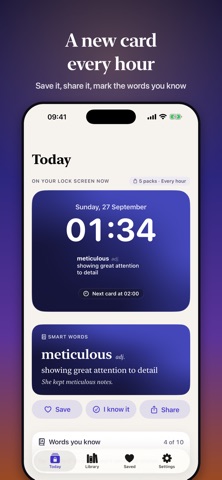
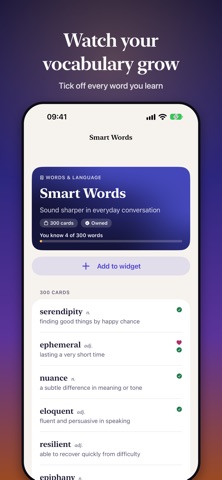
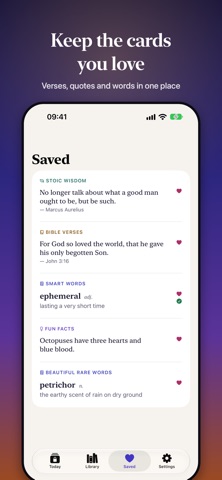
LockWords puts a new card under the clock on your Lock Screen, every hour or on whatever schedule you pick: a word worth knowing, a Bible verse, a line from Marcus Aurelius, a strange fact or a riddle. You look at your phone all day anyway, so each look might as well teach you something. CHOOSE WHAT YOU SEE Mix several packs into one widget, or pin a single pack to each widget. Words: Smart Words, SAT and GRE words, rare and beautiful words, idioms and where they come from, Latin phrases, Spanish and French basics, business vocabulary Faith: Bible verses (KJV), verses for anxious days, short daily prayers Mind: affirmations, Stoic quotes, calm reminders, self-love and confidence Growth: discipline and motivation, money wisdom Curiosity: fun facts, space and science, psychology, On This Day Fun: riddles, with the answer showing up halfway through the hour LEARN WITHOUT SITTING DOWN TO STUDY Tap "I know it" on a word and it leaves the rotation. The Home Screen widget has I know it, Save and Next buttons, so you don't have to open the app. A small ring on the Lock Screen shows how much of your word packs you already know. Share the cards you like with friends. THE DETAILS • Lock Screen and Home Screen widgets • A new card every 30 minutes, every hour, every few hours or once a day • Works offline • The app speaks 14 languages; the cards are in English • No account, no ads, no tracking PAY ONCE, KEEP IT Affirmations are free for good, and every other pack gives you 10 free cards to try. Unlock a single pack with a one-time purchase, or get All Packs, which also includes every pack we add later. There is no subscription. Right now there are 22 packs and nearly 5,500 cards. Terms of Use: https://xzot.github.io/lockwords/terms.html Privacy Policy: https://xzot.github.io/lockwords/privacy.html
Screenshots