LuDo Cal - Calendar & Notes
Alejandro Alvarez Wilmanski

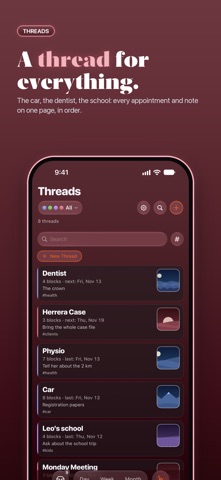
LuDo Cal is a different approach to your current calendar. It doesn't replace it: it works on top of the iCloud and Google calendars you already have, and gives every appointment a memory and a thread to belong to. Some appointments keep coming back: visits to the pediatrician, the Monday team meeting, servicing the car or the furnace, the HOA meetings. Some plans come together bit by bit, like your next trip, and some days are worth writing down, like in a diary. With LuDo Cal you write in each event what was said, what's still to do, and what to bring, and add it to a thread. A thread brings every event and note about one thing together on a single page, in order, in the context that makes sense of them. Create as many threads as you like. Add the next event from the thread itself, add it later, or create it in the calendar app you already use: LuDo Cal is flexible and fits the way you think. Tasks adapt to you. Don't want them? Leave them off, and LuDo Cal stays a calendar with a memory. Basic tasks work like a reminder: a title, a date, an alert, done. Advanced tasks are a full task manager built around time blocking: plan when you'll do each task, apart from when it's due, and see it in your day next to your events, with repeats and subtasks, in the thread where it belongs. Either way, they can sync both ways with Apple Reminders. Keep the papers with the visit: attach photos, scans and files to what you write, and find the quote, the receipt or the prescription in the thread they belong to. Give an event a real place: search it, see it on a map, and know when to leave. If you turn it on, LuDo Cal shows the travel time between your events, draws your day's places on a map, and can alert you when it's time to go. It works for what happens every week and for what comes back once a year, for people who are already very organized and for people who want to be. Use LuDo Cal alongside your favorite calendar app, on top of your iCloud or Google calendars, or as your only calendar app. It's up to you. On iPad, LuDo Cal has a design of its own, with your week and your threads side by side. On Apple Watch, today's events, your tasks, your notes and your threads go with you. LuDo Cal reads and writes the calendars on your iPhone and iPad with the permission you give it (Outlook and Exchange calendars are read-only). There's nothing to import, and what you write in LuDo Cal never reaches your calendar: if you ever delete it, your calendar is exactly as it was. LuDo Cal is private by design: no accounts, no ads, no analytics. Your notes travel encrypted through your iCloud to sync with your other devices. And you can share the threads you choose with one other person, say the one you already share a family calendar with on iCloud or Google. No subscriptions, no strings attached: pay once and the app is yours, with every update included.
Screenshots