Lite Sky
Jack Setton

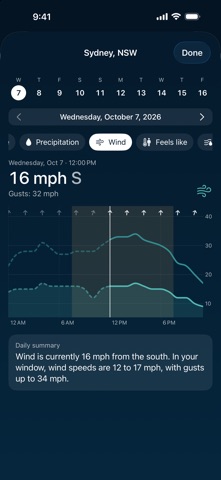
Lite Sky helps you understand the forecast for the part of the day you actually care about. Set a Custom Day window—7:30 a.m. to 7:30 p.m. by default—and Lite Sky summarizes Apple’s hourly conditions inside those hours. Rain forecast overnight can still appear in the hourly timeline without controlling the headline for your selected daytime window. Turn Custom Day off whenever you want Apple’s full-day forecast instead. Search for cities around the world, save the places you follow, and view every forecast in that location’s local time. Current location is optional and is requested only while the app is open. Deny location access and the complete city-search experience remains available. Open any day for hourly temperature, precipitation chance, wind, gusts, direction, fog, and visibility. Plain-language notes explain which hours shaped the day’s headline and identify relevant weather outside your selected window. When hourly coverage is limited, Lite Sky clearly falls back to Apple’s full-day forecast. Choose System, U.S., or Metric units. Saved locations, preferences, and a short-lived forecast cache stay on your device. Lite Sky has no account, ads, analytics, tracking, or developer-operated backend in version 1. Weather data is provided by Apple Weather. Lite Sky creates its custom summaries from Apple’s hourly conditions; Apple does not create or endorse those custom summaries. Weather data may be delayed, unavailable, or differ from actual conditions. Do not use Lite Sky for emergency or life-saving decisions.
Screenshots