GoSwipe: Photo Storage Cleaner
Mantas Varna

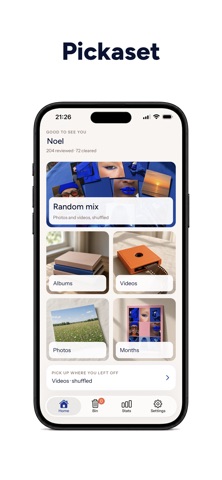
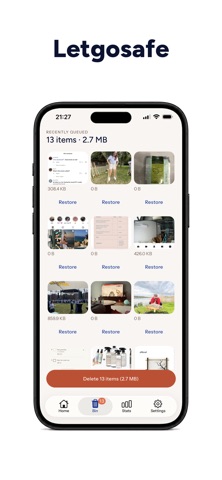
GoSwipe is a photo cleaner for iPhone. Swipe right to keep, swipe left to queue a delete, then confirm the batch in one tap. A camera roll you have been avoiding for years becomes something you can clear in a few minutes. HOW IT WORKS • Swipe right to keep a photo or video • Swipe left to queue it for deletion • Confirm the batch in the standard iOS delete sheet • Deleted items move to Recently Deleted, where iOS keeps them for 30 days Nothing is removed behind your back. Every delete goes through Apple's own confirmation sheet, and you have a month to change your mind. WHERE TO START • Random Mix — a shuffled stream of your whole library, good for a first pass • Photos — work through still images only • Videos — the fastest way to free up space, since video is where your storage actually goes • Albums — clean one album at a time, such as screenshots, a single trip, or a shared album YOUR PHOTOS NEVER LEAVE YOUR IPHONE GoSwipe reads your library on-device. No photo or video is uploaded, copied to a server, or shared with anyone. There is no cloud step and no hidden sync. The app needs photo library access to show you your photos and to delete the ones you pick, and that is the only thing it uses that access for. WHO IT IS FOR • Anyone staring at an iPhone Storage Full message • People paying for extra iCloud storage they would rather not pay for • Anyone sitting on thousands of screenshots, burst shots, and near-identical photos • Travellers clearing one trip's photos before the next one starts • People who want a tidy library without spending a weekend on it GOSWIPE PRO Free accounts get a set number of swipes to try the app. Keeps and deletes both count toward it, and the allowance does not reset. GoSwipe Pro includes: • Unlimited swipes • Sharing photos without the GoSwipe mark Every mode and the Bin stay free for everyone. GoSwipe Pro is an auto-renewing subscription billed to your Apple ID: • GoSwipe Pro Weekly — billed every week • GoSwipe Pro Yearly — billed every year Exact prices for your region are shown in the app before you purchase. Payment is charged to your Apple ID at confirmation. Subscriptions renew automatically unless cancelled at least 24 hours before the end of the current period, and your account is charged for renewal within 24 hours of the end of the current period. Manage or cancel your subscription in your Apple ID subscription settings. Restore Purchases is available on the paywall and in Settings. ACCOUNTS Sign in with Apple is on the first account screen. Google sign-in is also offered. You can delete your account, and everything attached to it, at any time in Settings. FREQUENTLY ASKED QUESTIONS Does GoSwipe delete my photos permanently? No. Confirmed deletes go to the Recently Deleted album, where iOS keeps them for 30 days before removing them. You can restore anything from there. Do my photos get uploaded anywhere? No. Your library is read on-device and nothing is uploaded. Does GoSwipe free up iCloud storage? If you use iCloud Photos, yes. Photos removed from your library are removed from iCloud Photos too once they leave Recently Deleted, so you reclaim device space and iCloud space. Can I clean only my screenshots? Yes. Open Albums and work through the Screenshots album on its own. Does it work on videos? Yes. Videos have their own mode, and they are usually where the biggest storage savings are. What happens when my free swipes run out? The next swipe opens GoSwipe Pro. Free swipes do not reset. Privacy Policy: https://swipe.elzeego.com/legal/privacy/ Terms of Use (EULA): https://swipe.elzeego.com/legal/terms/
Screenshots