Site Daily: Photo Reports
haidi wasso

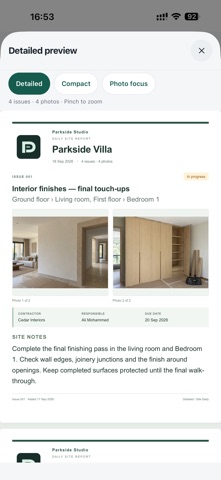
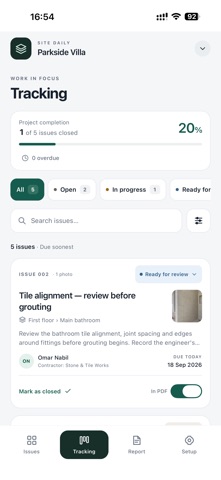
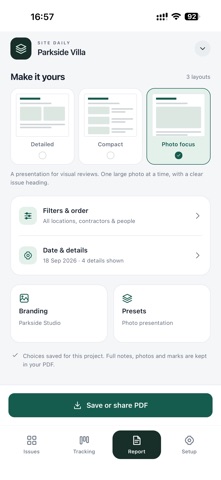
Turn your site walk into a clear report. Site Daily helps engineers and project managers capture observations, follow outstanding work and prepare professional PDF reports on iPhone and iPad. CAPTURE WHILE YOU WALK Take a photo, choose existing photos or write an issue without a picture. Keep several photos together, mark the important detail with an arrow, circle or line, and save unfinished work as a draft to complete later. KEEP EVERY ISSUE ORGANIZED Organize your projects into floors and areas. Assign one issue to several areas, even across different floors. Add a contractor, responsible person and due date using your saved lists and the calendar. FOLLOW THE WORK Track Open, In progress, Ready for review and Closed issues. Search and filter your list, then update the status as work moves forward. Closed issues stay in your records and are excluded from PDFs by default. Include them again whenever you need to. CREATE REPORTS YOUR WAY Choose Detailed, Compact or Photo focus. Add your company name and logo, select multiple areas, contractors or people, and choose which details to show. Preview your report, save a preset for next time, then save or share the PDF. KEEP A RECORD OF WHAT YOU SENT Report history preserves each PDF as it was exported. Later edits to an issue do not change an earlier report. Open or share a saved report again from History. WORK ON YOUR DEVICE No Site Daily account is required. Your projects are stored on your device, with manual backups for projects, photos and saved reports. Core capture, tracking and PDF creation work offline; online sharing and downloading cloud photos may need an internet connection. There is no automatic synchronization between devices. Save a backup somewhere accessible before replacing your device or removing the app. Current limits: 10 active projects, 50 projects in total, 100 issues per project and 8 photos per issue. Device storage and the app's storage limits also apply.
Screenshots