Plus Messenger App - ChatPilot
Tan Khai Phan Truong

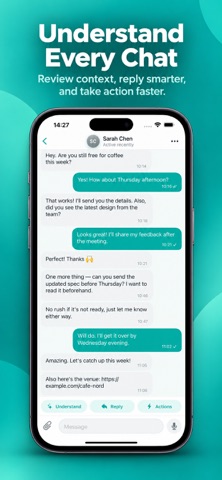
Bring selected conversation content into one place and turn it into useful information. Import screenshots, paste text, or open supported files to review conversations in a clean and organized format. FEATURES • Combine multiple screenshots into one conversation • Review conversation summaries and key details • Find tasks, dates, questions, and follow-ups • Create and improve suggested replies • Rewrite text with different tones • Translate selected text • Organize conversations with custom spaces • Save useful conversations and notes • Keep track of follow-ups and reminders • Review people and details found in imported conversations • Export saved content when needed • Customize appearance, colors, and chat style You choose what content to import and analyze. Some AI-powered features may send selected conversation text, including text extracted from screenshots or text you provide, to OpenAI for processing only after you give permission. Some features may require an internet connection. Your subscription will be charged to your iTunes account at confirmation of purchase and will automatically renew (at the duration selected) unless auto-renew is turned off at least 24 hours before the end of the current period. Current subscription may not be cancelled during the active subscription period; however, you can manage your subscription and/or turn off auto-renewal by visiting your iTunes Account Settings after purchase. Privacy Policy: https://sites.google.com/view/contact-app-center/privacy-policy Term Of Service: https://sites.google.com/view/contact-app-center/terms-of-service
Screenshots