RadarNav: Safe Driving Alerts
Luan Gjokaj

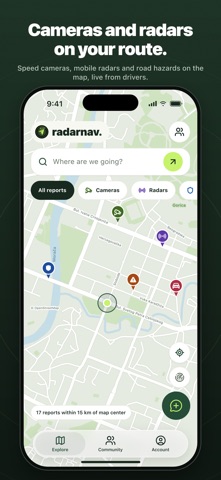
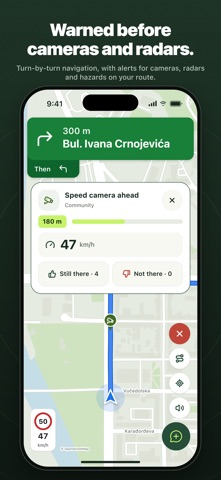
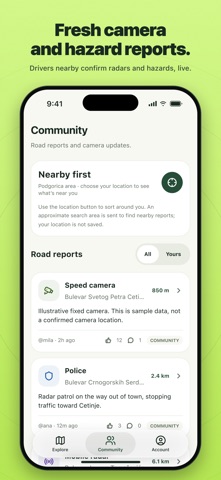
RadarNav helps you keep to the speed limit and know in time what is ahead: the posted limit, speed cameras, and the hazards and traffic other drivers have reported. WHAT YOU GET • When a camera or report is ahead, the alert shows your speed next to the posted limit and turns red if you are over it • A map of fixed speed cameras and driver reports: mobile radar, police, drone patrols, hazards and traffic • Drive alerts with no destination: open the app, start driving, and RadarNav warns you about what is ahead. It keeps warning you after you lock the phone, on the Lock Screen and in the Dynamic Island, and stops when you park. • Turn-by-turn guidance with voice directions, automatic rerouting, and the same camera and report alerts along your route. Live directions on the Lock Screen and in the Dynamic Island. • Place and address search on the map • The posted speed limit exactly as the sign shows it, recorded by the drivers who passed it and converted to your unit • One tap to report, at your position or at any point you pick on the map • Confirm or dispute what others reported. Reports expire on their own, and five "not there" votes remove one sooner. • 88 speed camera locations in Montenegro taken from the published state design document, kept separate from community reports • Contribution points, levels and a public profile • Friends you both agreed to add, visible on the map while you drive • 11 languages: Montenegrin, Bosnian, Croatian, Serbian, Albanian, Macedonian, English, Polish, Italian, French and Spanish • Kilometres or miles, light and dark mode BUILT FOR PRIVACY RadarNav keeps no journey history and no location history. A report stores only the point you chose. Other drivers see a report without a name. Your position is shared only while the sharing setting is on and only while you are driving with the app open: rounded, anonymous, under a new id for every drive, and deleted within a minute of the last update. Only friends who added you, and whom you added, see your name and speed. You can delete your account and everything in it from Account, Settings. DRIVE RESPONSIBLY RadarNav is an awareness app, not a radar detector. It detects no signals and shows only what drivers and public documents have published. Alerts are there so you slow down in time and keep to the limit along the whole road, not just at a camera. Obey the speed limit and the traffic law of the country you are driving in. Set the app up before you set off and do not handle your phone while driving. Terms of Use: https://radarnav.me/terms-of-service Privacy Policy: https://radarnav.me/privacy-policy Subscription: RadarNav Navigation is offered as a monthly or a yearly auto-renewing subscription. Payment is charged to your Apple Account at confirmation of purchase. It renews automatically at the same price unless cancelled at least 24 hours before the end of the current period. Manage or cancel it in your Apple Account settings.
Screenshots