Audoc: Read Aloud PDF & Docs
Picassosoft

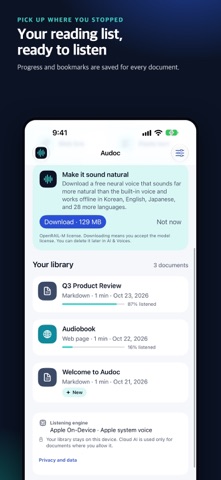
Turn the documents you never get time to read into something you can listen to on the commute, at the gym, or with your eyes closed. FOLLOW ALONG AS IT READS Audoc highlights the sentence you are hearing and, with Apple voices, each word as well. Look up at any moment and you know exactly where you are. TABLES AND CHARTS THAT MAKE SENSE OUT LOUD Plain text-to-speech turns a table into a stream of numbers. Audoc tells you the size of the table and reads every row with its column names. Charts, diagrams, and pictures are described where they appear in the document. BRING IN ANYTHING • PDF, Word, PowerPoint, Excel, OpenDocument, EPUB, HTML, Markdown, RTF, CSV, and text • Korean Hangul documents: HWP and HWPX • Older Office files (DOC, PPT, XLS), WPS, Pages, Keynote, and Numbers • DRM-free Kindle books (MOBI, AZW3) and FB2 • Email (EML, MSG), saved web pages (MHTML, web archive), XPS, and multi-page TIFF scans • Subtitles (SRT, VTT), Jupyter notebooks, AsciiDoc, reStructuredText, Org, and LaTeX • Older text files in Korean, Japanese, and Chinese encodings • Paste a web link: Audoc keeps the article and skips menus and ads • Scan paper pages with the document camera, or open a photo of a page: on-device text recognition reads it • Share a page, file, or text to Audoc from Safari, Mail, or Files • Paste any text PICK UP WHERE YOU STOPPED • Your place is saved for every document • Bookmark the parts you want to hear again • Continue listening from the library or the Home Screen widget • Sleep timer, from 5 minutes to the end of the current part • Playback speed from 0.75× to 2×, with Lock Screen and Control Center controls • Export a document as an audio file to play anywhere MADE FOR EVERY SCREEN On iPhone Duo and iPad, your library and the player sit side by side, with the listening script next to the text being read. Fold iPhone Duo and Audoc keeps playing from the same place. Dark Mode is supported throughout. NATURAL VOICES THAT WORK OFFLINE Use Apple’s voices, or download a free multilingual neural voice (Korean, English, Japanese, and 28 more languages) inside the app. TRANSLATE AND LISTEN Translate the listening script into Korean, English, Japanese, Chinese, Spanish, French, German, Portuguese, Hindi, or Arabic with Apple Intelligence or a downloadable Gemma model on your device, then listen in the new language. PRIVATE BY DEFAULT Documents are processed on your iPhone or iPad. No account, no ads, no tracking. Nothing is uploaded unless you add your own Gemini or OpenAI key and allow cloud processing for a specific document. GOOD TO KNOW • AI descriptions and translations can contain mistakes; check important details against the original. • Voice and AI downloads are optional and large. Speed and quality depend on your device’s memory, storage, and the document. • Apple Intelligence translation needs a device and region where Apple Intelligence is available. • Imports are limited to 256 MB. Legacy DOC, PPT, and XLS files may have less structure than DOCX, PPTX, and XLSX. Numbers files are read as text values without their cell positions. • Password-protected and DRM-protected files can't be opened. HWP 3.0 files from before 2002 need to be saved again in a recent version of Hangul. • Pages that require signing in cannot be opened from a link. • Requires iOS or iPadOS 18 or later. 본 제품은 한글과컴퓨터의 한/글 문서 파일(.hwp) 공개 문서를 참고하여 개발하였습니다.
Screenshots