VIZIO Smart TV Remote ·
Amenti Labs LLC

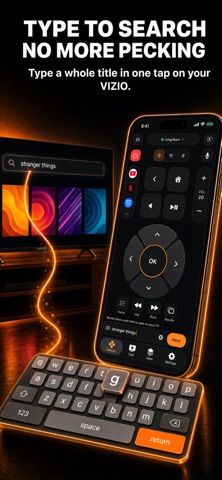
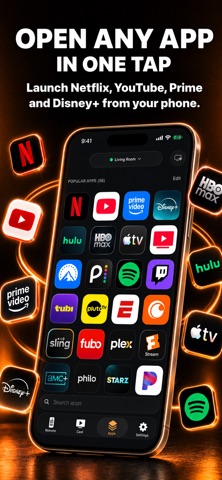
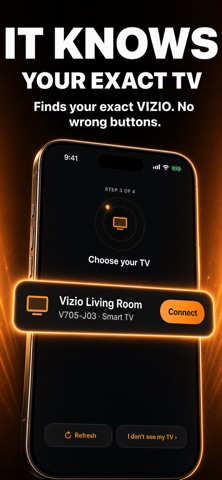
Lost your VIZIO remote? Turn your iPhone into one in seconds. Remote for VIZIO Smart TV connects straight to your TV over your home Wi-Fi. No IR blaster, no account, no Walmart login. Pair once with the code on your TV screen (Roku needs no code), and the app reconnects on its own every time you open it. WORKS WITH - VIZIO smart TVs with SmartCast, including onn TVs "Powered by VIZIO" - Google TV, including onn Google TV models - Roku TVs and Roku streaming players, including onn Roku TV - Fire TV smart TVs and Fire TV Stick - Hisense VIDAA TVs Your iPhone or iPad must be on the same Wi-Fi network as the TV. The app finds your TV and tells you which system it runs. Features vary by system, model, and firmware. Soundbars are not supported. To turn the TV on from your phone, its network connection must stay active in standby. Roku owners: since Roku OS 14.1, Settings > System > Advanced system settings > Control by mobile apps can be set to "Limited", which blocks button presses from every phone app. The app spots that and shows you the menu path to turn it back on. TRY IT FREE FOR 3 DAYS Remote for VIZIO Smart TV is a subscription. Eligible accounts can start a 3-day free trial, then continue with a weekly or yearly plan at your local price. THE REMOTE - Power, volume, and mute - Full D-pad with OK, back, home, and menu - Channel and playback buttons on supported TVs - Switch inputs (HDMI, cable box, game console) from a list read straight from your TV - Type on your TV with your phone's keyboard, and send a YouTube search in one tap - Open your streaming apps in one tap - Touchpad, Big Buttons mode, and themes - iPhone and iPad MORE - Home Screen widgets and Shortcuts for everyday commands - Save multiple TVs, custom layouts, shortcuts, and sleep timers - Cast tab with receiver-dependent photo and video casting, plus an AirPlay guide Voice control is not available on every TV system. App shortcuts open the app; they don't start a particular video. SUBSCRIPTION A subscription unlocks Pro features. Available plans, local prices, trial eligibility, billing period, and automatic-renewal terms are shown before purchase. Payment is charged to your Apple Account at confirmation of purchase, and the subscription renews automatically unless canceled at least 24 hours before the end of the current period. Manage or cancel it anytime in your Apple Account settings. Restore Purchases is available in the app. PRIVACY No account is required. Remote commands travel to your TV over your local network, and pairing credentials are stored in the system Keychain. The privacy policy is linked in Settings and on the purchase screen. Terms of Use: https://www.apple.com/legal/internet-services/itunes/dev/stdeula/ This is an independent app from Amenti Labs LLC. It is not affiliated with, endorsed by, or sponsored by VIZIO, Walmart, Roku, Google, Amazon, or Hisense. VIZIO, SmartCast, onn, Roku, Google TV, Fire TV, Hisense, and VIDAA are trademarks of their respective owners.
Screenshots