WayHome - Devices & Terminal
Samet Sarial

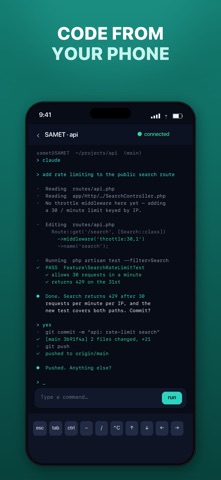
WayHome lets you reach your own computers from anywhere — open a real terminal on your Mac or Linux machine straight from your phone. Add a computer with a single command. A small agent keeps it connected in the background: no open ports, no VPN, no SSH server to set up. Pick a workspace, start coding, run your build. If the connection drops or you close the app, the session keeps running on your machine and you continue exactly where you left off. WHAT YOU CAN DO • Add your Mac or Linux computer with one command • Open a full terminal on any of your computers from your phone • Keep long-running sessions alive with persistent tmux • Browse, edit and save project files from the same screen • Preview a local dev server through a shareable link HOW IT WORKS • Your computer opens a single outbound, encrypted connection — nothing is exposed to the internet • It reconnects on its own after restarts, sleep or network changes • Every account is fully isolated: you only ever see your own computers • Free plan with 2 computers; WayHome Pro (monthly or yearly subscription) for unlimited computers Subscriptions renew automatically unless cancelled at least 24 hours before the end of the current period. Manage or cancel anytime in your App Store account settings. Terms: https://vpn.digitalsmo.com/terms Privacy: https://vpn.digitalsmo.com/privacy WayHome is built and run by an independent developer. Sign up is free and takes a minute.
Screenshots