Niltext
Przemyslaw Kaczmarski

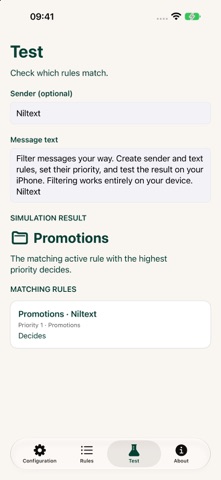
Niltext helps you organize unwanted SMS and MMS in Apple Messages using rules you create. Match senders and message text, choose a category, and keep control of what your filter does. YOUR RULES, YOUR CHOICES Choose a specific sender, phone numbers only, or sender IDs. Match message text with contains, does not contain, starts with, or ends with. Combine conditions in nested AND/OR groups for more precise rules. CLEAR PRIORITIES Classify matching messages as Junk, Promotions, or Transactions, or choose Do not filter. Both the sender and text conditions must match. The first matching enabled rule decides, and you can change the order or switch individual rules off. TEST BEFORE YOU RELY ON A RULE Enter a sample sender and message to see matching rules and the simulated result as you type. Niltext tells you when missing input makes the result incomplete. FILTERING ON YOUR IPHONE Rules are evaluated locally, without sending message content to a filtering server. No account is required. Choose your app language and a light, dark, or system theme. To start, enable Niltext in the message filtering section of iOS Settings, then add your rules. iOS decides which messages are eligible for filtering; this includes SMS/MMS from unknown senders, not iMessage. Niltext categorizes messages rather than blocking delivery. It uses your enabled rules and does not include a built-in spam list or promise to detect every scam.
Screenshots