Spend Monthly: Expense Tracker
Wan Kamaruzaman Bin Muhammad

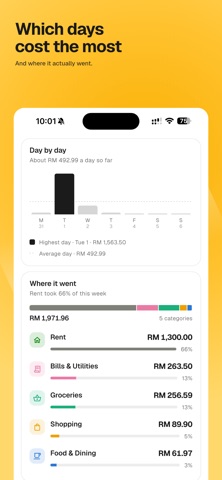
Spend Monthly is a quiet expense tracker. You write down what you spend, and it tells you where the money went. HOW AN EXPENSE GETS IN Type it. The plus button, a keypad, and it is saved. Works with no internet, and works for cash, which nothing automatic can see. Photograph a receipt. Point the camera at it and the amount, the shop and the date are read for you. You see it before it is saved. Share a receipt. Paid with DuitNow QR, a transfer or a card? Send the receipt your banking app shows you straight to Spend Monthly, and the expense fills itself in. Forward it by email. Every account gets its own address. Anything with a payment on it becomes an expense, and you check each one before it is kept. WHAT IT SHOWS YOU What you have spent this month, and how that compares with last month. Budgets you set yourself, per category or across everything. It tells you once when you are getting close, and never nags. Which days cost the most, what you spend on repeatedly, and where this month is heading if the rest of it looks like the start. THE SMALL PRINT Free to use, with a limit on how many expenses arrive each month. Plus lifts the limits and is a monthly or yearly subscription; the price in your own currency is shown before you pay, and you can cancel any time in Settings. English and Bahasa Melayu. Light and dark. Your records are yours: you can export them, and you can delete your account and everything in it from inside the app or from spendmonthly.com/delete-account. Terms of Use (EULA): https://www.apple.com/legal/internet-services/itunes/dev/stdeula/ Privacy Policy: https://spendmonthly.com/policy
Screenshots