BookJot: Book Spending Tracker
Watsamon Pongsupan

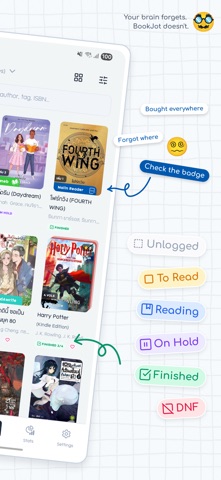
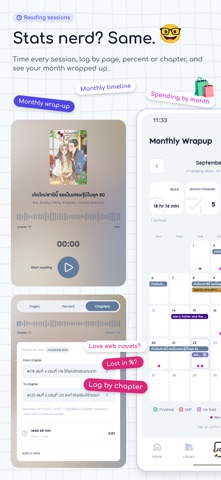
Ever bought the same book twice? Owned one as both an e-book and a paperback? Stood in front of your shelf, unsure whether you already have it? Or paid full price for a book you could have borrowed for free, legally? (Knowing first saves a lot.) Book Jot started with my own small problem. A while after I began reading e-books, I could no longer remember which app I had bought a book in, or where to open it. Every sale sign got me too, so I was buying faster than I could read, and paperbacks and e-books ended up in one big muddle. I started with a plain spreadsheet, but it felt lifeless (pretty covers really do make a difference). Then a proper database, which was still hard to open on the go, nothing like a phone app you open and there it is. So in the end I built the app for myself. Then I showed it off to friends in a book group. Turns out plenty of them wanted to try it, and plenty had the same problems. So I started building it for real (so for real that I now dream of quitting my job to do it full time~). Many ideas and features come from fellow readers who point me to them, or from scrolling through the problems people share in the group, plus the fun things I want to do with my own pile of books. If you have an idea, I would love to hear it. — BOOK PURCHASE TRACKER — • Record every purchase: price, shop, date and each book on the receipt • See what you spend on books each month and at each shop • Look up when you bought a book and how much it cost • Works for paperbacks and for e-books from Kindle, meb, Naiin, pinto and more — READING LOG — • Your own shelves: want to read, reading, finished • Log pages, reading time and your own reviews • Monthly and yearly reading summaries • Reading receipts to share, and ranking boards for your favourites — A TIDY LIBRARY — • Series in order, so you can see which volume you are missing • Your own collections and groups, private or shared • Note books you lend or borrow, and when they are due back • Scan an ISBN or barcode to add a book in seconds — PHONE AND WEB — • One account, the same library on every device • Open your library on the web too: search it and export it to CSV — FREE, WITH OPTIONAL PLANS — Book Jot is free, and everything you need to track your books stays free. If you want to support it, two optional plans, monthly or yearly: • Notetaker: no ads, every theme and look in the app, and editing tools on the web • Archivist: everything in Notetaker, plus the full web toolkit for big libraries: add records from the keyboard, edit many at once, import from KOReader Made by one person and a few cats. Every piece of feedback is read.
Screenshots