Audio Cutter: MP3 Editor
Sunil H N

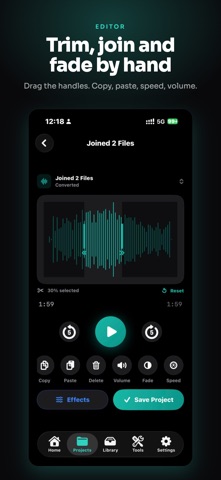
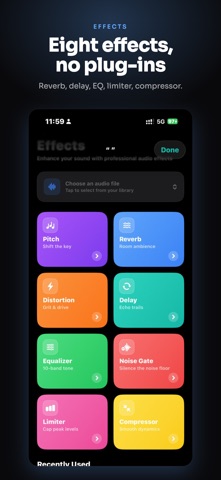
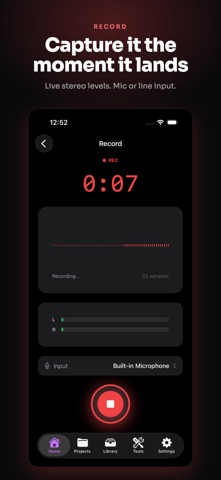
Audio Editor Lite — Create Audio Your Way Audio Editor Lite is a powerful audio editing and recording studio for your iPhone. Easily cut, trim, record, mix, convert and enhance your audio with professional-inspired tools in a simple mobile interface. Whether you're editing a song, recording your voice, creating a ringtone, or adding effects to an audio clip, Audio Editor Lite gives you the tools to get it done. Powerful Audio Editing Quickly edit your audio with essential tools: • Trim and cut audio • Copy and paste sections • Delete unwanted parts • Adjust volume • Fade in and fade out • Change playback speed • Replace sections of audio High-Quality Audio Recording Record audio directly from your iPhone with a clean and simple recording interface. Perfect for: • Voice recordings • Podcast clips • Music ideas • Voiceovers • Personal recordings Audio Effects Transform your sound with built-in effects: • Pitch • Reverb • Distortion • Delay • Equalizer Preview your changes and fine-tune your audio before saving. Advanced Equalizer Shape your sound with an adjustable equalizer and presets. Enhance different types of audio and create the sound you prefer. Create Ringtones Turn your favorite audio clips into custom ringtones. Trim the section you want, edit it, and export it for use as a ringtone. Convert Audio Convert compatible audio files between supported formats and choose your preferred quality settings. Import Audio Bring audio into the app from multiple sources, including: • Files • Video extraction • Other apps • Clipboard • Supported transfer methods Organize Your Audio Keep your recordings, edited files, converted audio and ringtones organized with an easy-to-use file manager and project system. Built for Creators Whether you're a musician, content creator, student, podcaster, or simply need a quick way to edit an audio file, Audio Editor Lite puts essential audio tools right on your iPhone. Record. Edit. Enhance. Convert. Create. Terms of Use (EULA): https://www.apple.com/legal/internet-services/itunes/dev/stdeula/ Privacy Policy: Available inside the app via Settings
Screenshots