SPSS File Viewer
Rafal Rybnik

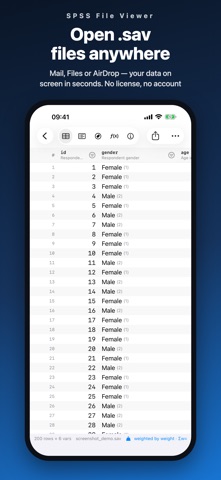
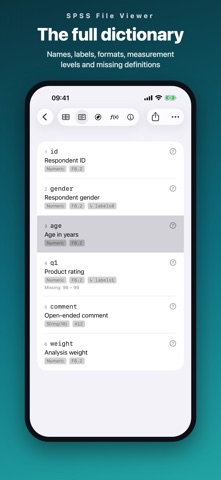
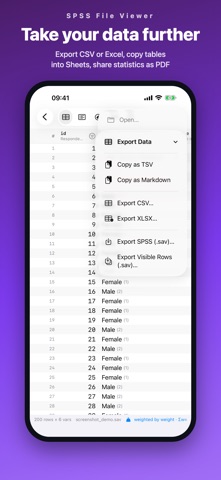
SPSS File Viewer opens SPSS data files right on your iPhone or iPad. No desktop license, no cloud upload, no account — open a .sav file from Mail, Files or AirDrop and see your data in seconds. VIEW YOUR DATA • Fast data grid for thousands of rows and hundreds of variables • Value labels shown inline (toggle raw values any time) • Full variable dictionary: names, labels, types, formats, measurement levels, missing definitions • Value label sets with every code–label pair UNDERSTAND YOUR DATA • Frequencies with percentages, valid/cumulative percent and bar charts • Descriptive statistics: mean, median, quartiles, standard deviation, skewness, kurtosis and more • Histograms and distribution summaries • Weighted statistics — respects the weight variable stored in your file • Split-file analysis by any categorical variable • Filters, sorting, random sampling SHARE AND EXPORT • Export data to CSV or Excel (XLSX) • Copy tables as TSV (paste straight into Google Sheets or Excel) or Markdown • Statistics reports as text, Markdown or PDF • Save filtered subsets back to .sav FILE SUPPORT • SPSS .sav and compressed .zsav • SPSS portable .por • Handles long strings, custom missing values, dates and multi-byte encodings Everything runs on your device. Your data never leaves your phone. Need more than viewing? TRTT — our full SPSS alternative — adds editing, crosstabs, chi-square, t-tests, ANOVA, regression, charts and a real syntax window. Search for "TRTT" on the App Store.
Screenshots