Hono - Live Video Translator
青云 王

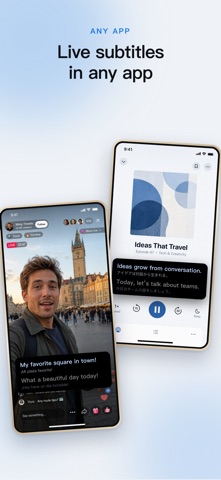
■ Live translated subtitles for any app Livestreams, TV series, online meetings, classes, podcasts, variety shows, foreign-language video in your browser. If the sound is playing on this iPhone, the app listens and turns it into translated subtitles as it goes. ■ Record clips with the subtitles in them Turn on Record from the Window in Settings › Try New Features and the floating window gets a play key: tap to start recording, tap again to stop. Picture, sound and translated subtitles are saved together as a 720p video in Photos, so you can watch it again later. iOS screen recording can’t run while audio is being shared; this fills that gap. ■ A subtitle card, as tall as you like The newest line sits on top and earlier ones move down. Drag the card’s top edge to set its height: taller lets you catch the last few lines, and at one line it is a slim bar that barely covers the picture, good for landscape. Show Translation, Bilingual (translation above, original below) or Original. ■ On-device AI, privacy first Speech recognition and translation both run on your iPhone. No server, no account, no third-party SDKs. The shared audio becomes text on the device, only that text goes to the subtitle window, and nothing is uploaded. ■ Download once, then it works offline The first time you use a language, your iPhone downloads that language's model once. After that, captions keep working with no network at all. ■ Many languages, your choice of direction Spoken languages include English, Japanese, Chinese, Cantonese, Korean, German, French, Spanish, Italian, Portuguese, Russian, Turkish and Indonesian, and subtitles can be translated into up to 20 languages. ■ Free to try When you want unlimited use, choose a monthly plan, a yearly plan with a 7-day free trial, or a one-time lifetime unlock. New users also get a limited-time welcome offer; subscribers can upgrade to lifetime in one tap, and offer codes can be redeemed on the purchase page. How it works: one tap Pick what is being spoken and what you want the subtitles in, tap Start Sharing Audio once, and confirm Start Sharing in the sheet iOS shows. Switch back to what you were watching, and the subtitle card follows as a floating window. Before you buy · Requires an iPhone running iOS 26 or later. · The status bar shows a red indicator while audio is being shared. That is the standard iOS indicator. The screen is only recorded when you turn on Record from the Window and start a recording, and clips go only to your Photos. · Changing the spoken language means starting audio sharing again. The subtitle language can be changed at any time. · iPhone allows only one Picture in Picture window at a time, so if the app you are watching opens its own video PiP, it will close the subtitle window. Subscription terms · A monthly plan, a yearly plan and a one-time lifetime unlock are available. Prices are shown in the app. · The yearly plan includes a 7-day free trial for eligible new subscribers; the monthly plan has no free trial. Unless you cancel at least 24 hours before the trial ends, it becomes a paid yearly subscription. The app can remind you the day before. · Eligible new users can get the first month of the monthly plan at an introductory price; it then renews at the regular monthly price shown in the app. · Payment is charged to your Apple Account at confirmation of purchase. Subscriptions renew automatically unless auto-renew is turned off at least 24 hours before the end of the current period. · Manage or cancel in Settings → your name → Subscriptions. The lifetime unlock never renews. If you buy it while subscribed, cancel the subscription in Settings; Apple will not do it for you. · Privacy Policy: https://honoapps.com/subtitles/privacy/ · Terms of Use (Apple standard EULA): https://www.apple.com/legal/internet-services/itunes/dev/stdeula/ Questions or suggestions: livecaptiondev@gmail.com
Screenshots