Wreader Ebook reader
ALWALEED ALRUTHAYA

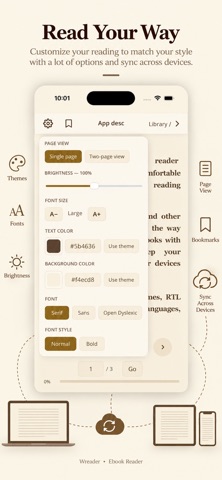
# Wreader — Ebook Reader Wreader is an ebook reader designed to give you a comfortable and customizable reading experience. Open EPUB, PDF, MOBI ,TXT, and other book formats, personalize the way you read, listen to your books with TTS (Text-to-Speech), and keep your library synced across your devices using Google Drive. Enjoy dark and sepia themes, RTL reading support, multiple languages, highlights, bookmarks, notes, and more. ## Features * **Open Your Books** — Import EPUB, PDF, TXT, and other supported formats. Your books are stored locally on your device. * **Text-to-Speech (TTS)** — Listen to your books and choose your favorite available voice for a comfortable, hands-free reading experience. * **Google Drive Sync** — Sync your books, library, and reading progress across your devices using your Google Drive. * **Reading Progress** — Keep track of your reading progress and continue where you left off. * **Right-to-Left (RTL) Reading** — Switch the reading direction for RTL languages such as Arabic and Hebrew. * **Sort & Genres** — Organize your library by recently added, title, reading progress, or genre. Create and edit genres for your books and group your library by genre. * **Bookmarks, Highlights & Notes** — Bookmark pages, highlight important passages, and add personal notes while you read so you can easily return to important ideas later. * **Light, Dark & Sepia Themes** — Choose the theme that feels best for you. Your selected theme is applied across the app and supported readers. * **Multiple Languages** — Use Wreader in English, العربية, 中文, Français, Español, and more. * **Customize Your Reading Experience** — Adjust font size, text color, background color, and other reading options to make reading more comfortable. * **Clean & Comfortable Reader** — Enjoy a simple, distraction-free interface designed to keep the focus on your books. Your books. Your way. **Read. Listen. Highlight. Take Notes. Sync. Anywhere with Wreader.** Terms of Use: https://www.apple.com/legal/internet-services/itunes/dev/stdeula/
Screenshots