Long Jump Coach: Athletics AI
Jelle Heijne

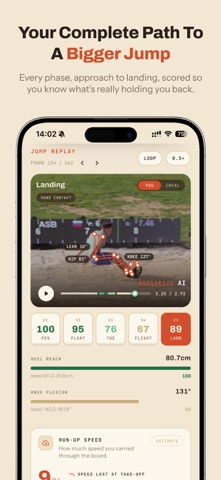
Athletics AI is a long jump video analysis app for iPhone and iPad. Film one jump on your phone. Athletics AI scores your technique out of 100 and names the one fix that costs you the most distance, with drills to fix it. WHAT ATHLETICS AI DOES Athletics AI analyzes one event: the long jump. It reads your video frame by frame, from approach to landing. It scores five phases: penultimate step, plant, toe-off, flight and landing. It measures knee angle, hip extension, trunk lean and hip drop. It compares each measurement to an ideal range. It ranks the fixes, the one costing the most distance first. Each fix comes with a drill and a dose, such as 3 × 20m. One analysis takes about 1 to 2 minutes. A REAL COACHING CUE FROM ATHLETICS AI "Reduce hip drop during the penultimate step from 13.4cm to the optimal 4.55–8.45cm." Every cue names the phase, your measured number and the target range. USE ATHLETICS AI TO Find out why a jump felt wrong. See which of the five phases is costing you distance. Check your knee angle and trunk lean at toe-off. Fix your penultimate step. Get a drill and a dose for your weakest phase. Track your technique score from session to session. Compare each jump to your personal best and your goal. Get technique feedback when you train without a coach. Analyze several athletes from one coach account. WHO ATHLETICS AI IS FOR Long jumpers who train without a coach. Athletes in a training group whose coach can't review every jump. Coaches who want measured feedback on every athlete in their squad. HOW IT WORKS 1. Film one long jump side-on, with the approach and landing in frame. 2. Upload the video to Athletics AI. 3. The app finds the key frames and measures each phase. 4. You get a technique score, five phase scores and ranked coaching cues with drills. 5. Do the drills, jump again and track the change. HOW TO FILM FOR THE BEST RESULT Film from the side, at a right angle to the runway, level with the board. Keep the whole approach and the landing in frame. Use 60 frames per second or higher. A takeoff lasts about a tenth of a second. At 30fps that is three frames. A phone is enough. A tripod helps. PRICING Athletics AI is free to download. Full analysis results require an Athletics AI Premium subscription. Your first jump shows a preview of the analysis before you subscribe. Premium Yearly costs $44.99 per year and starts with a 3-day free trial. Premium Monthly costs $8.99 per month and has no free trial. Prices are in US dollars and vary by country. Subscriptions renew automatically unless cancelled at least 24 hours before the end of the current period. QUICK FACTS Event covered: long jump only. Devices: iPhone and iPad, iOS 15 or later. Android: not available yet. Language: English. Made by: Jelle Heijne, a long jumper with a 6.36m personal best. FREQUENTLY ASKED QUESTIONS Is Athletics AI free? The download is free. Full results need Premium: $44.99 per year or $8.99 per month. Does Athletics AI work for triple jump, high jump or sprints? No. Athletics AI analyzes the long jump only. Do I need special equipment? No. A phone camera is enough. Filming at 60fps or higher gives the best result. Can a coach use Athletics AI for a whole squad? Yes. One account can hold several athletes. How long does an analysis take? About 1 to 2 minutes per jump. Is Athletics AI on Android? Not yet. It is available on iPhone and iPad. Footage in the screenshots: @JumperOneAthletics.
Screenshots