Bolsaro: Daily Expense Tracker
Ivan Francisco Jara

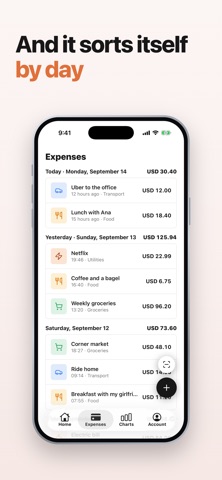
Your bank already emails you every time you use your card. Bolsaro reads those emails and logs each expense for you: amount, store and a suggested category. No bank login, no passwords, nothing to type. EXPENSES THAT LOG THEMSELVES Set it up once from your computer in about 3 minutes: forward your bank's alerts from Gmail or Outlook to your Bolsaro address. From then on, every purchase or subscription alert your bank sends becomes an expense, and your phone gets a notification so you can check it. Bolsaro suggests the category, and you change it with a tap. IT NEVER TOUCHES YOUR BANK Bolsaro doesn't connect to your bank account and never asks for your banking credentials. It only reads your bank's alerts, and the app shows you exactly which senders it reads so you can remove any of them. No ads, either. CASH AND RECEIPTS IN SECONDS What you pay in cash or with a wallet app takes two taps. Or take a photo of a receipt, pick an image from your library or share it to Bolsaro, and the expense fills itself in. HOW MUCH YOU'VE SPENT SO FAR Home shows your period total as a single number, with the percentage against the previous period so you know whether you're moving faster or slower than last time. And you pick the period: weekly, fortnightly or monthly, to match how you get paid. BUDGETS THAT WARN YOU Give any category a monthly budget. If your period is weekly or fortnightly, Bolsaro splits it by days. When a category goes over, you see it in red on the home screen, without opening anything else. YOUR EXPENSES, DAY BY DAY Every expense is grouped by date, with its amount, where you spent it and its category. Something you'd rather not count? Mark it ignored and it stops adding up, without having to delete it. CATEGORIES YOUR WAY Create the categories you actually use, give them an icon and a color, reorder them however you like and hide the ones you've outgrown. Your past expenses stay exactly where they are. CHARTS THAT MAKE SENSE • Cumulative pace: how your spending is tracking day by day against the same period last time, so you notice before the month runs out. • Optional projection: at this rate, what you'd finish the period having spent. • Spend per day: the last 15 days as bars. Tap any one to open that day. Both open full screen. WIDGETS See your budget and this period's spending on your Home Screen, and add an expense straight from the widget. MANY CURRENCIES, ONE TOTAL Log each expense in the currency you paid in. Bolsaro converts everything to your main currency at the day's rate, so the total is a real number instead of apples and oranges. USD, EUR, GBP, CAD, MXN, COP, CLP, ARS, BRL, PEN and more. WHAT BOLSARO IS FOR Keeping track of your daily expenses without fighting a spreadsheet or typing every purchase. Having your personal finances in one place. Noticing in time where the month is going, and adjusting before it's too late. SUBSCRIPTION Bolsaro Pro is sold as a weekly or annual subscription and starts with a free trial: 3 days on weekly, 7 days on annual. Each plan's price is shown in the app before you confirm. The subscription renews automatically unless you cancel at least 24 hours before the current period ends, and you can manage or cancel it from your App Store account settings. Privacy, terms and account deletion: https://bolsaro.app/en/legal Support: support@bolsaro.app
Screenshots