PreGuru: Timer & Slide Remote
transistors Co., Ltd.

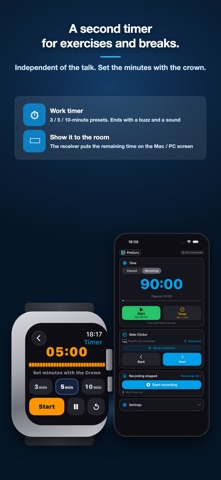
Finish right on time. Advance slides with a flick of the wrist. A timer and remote for talks, lectures and presentations. Your remaining time fills the screen of your Apple Watch and iPhone in extra-large digits. As it runs low the colour shifts white → orange → red; overtime flashes red and the end is a buzz on your wrist. And one flick of the wrist moves to the next slide. No clicker in hand, eyes on the room. PreGuru is for speakers, executives, professors and trainers — everyone who has to deliver in front of people. ■ Own your time, own the room. Elapsed and remaining time in extra-large digits. As time runs low the colour shifts white → orange → red, and if you run over, a flashing red frame and a vibration make sure you know. Swap elapsed and remaining with a tap. Never lose credibility by running over again. ■ Run the whole session. An independent countdown timer for exercises, breaks or workshops — separate from your presentation time. 3 / 5 / 10-minute presets, or set the minutes with the crown. It ends with a buzz and a sound. ■ Show the time to the room. With the free receiver installed, the remaining and elapsed time can be shown large on the Mac / PC screen — over the presentation, or in its own window for the chair. ■ One flick. No glance. — Air Swipe Swing the wrist wearing your Apple Watch and the slide advances. No clicker to hold, no lectern to look down at. Your eyes stay on the room while you keep talking. Large on-screen buttons and Apple Watch Double Tap work too. ■ Your wrist tells you when it will land. Apple Watch dims and eventually sleeps once it decides you are not looking, and flicks made then never arrive. PreGuru does not hide that — it reports it through your wrist. Two rising taps: you can send. One falling buzz: it may sleep soon, so tap the face once. One light tap: the slide was sent. You never have to look at the watch. ■ It learns how you move. Motion sensing is combined with on-device machine learning to suppress unintended triggers. Undo an accidental advance within 2.5 seconds and PreGuru records it as a mistake, growing more attuned to your own gesture the more you present. All learning and processing stay on the device — nothing ever leaves it. * This misfire-prevention technology is U.S. patent pending. ■ Drive the app you already use. Install the free PreGuru Receiver on your Mac or PC (get it at https://preguru.app — no account, nothing more to buy) and control Keynote, PowerPoint, Google Slides, PDF, Canva, Prezi and anything else that advances with the arrow keys. ■ Capture what matters. Long-form recording on your iPhone, continuing in the background so you can review it later. External microphones are supported. Hand the audio to a generative AI and transcription takes moments. ■ iPhone alone works too. Time management, recording and slide control all work with just your iPhone — no Apple Watch required. ■ One-time purchase. No subscription. Buy once, use every feature. ■ And your hands are free. No clicker to hold, no laptop to hover over. With both hands free, you gesture, you move, you connect — because a presentation is a live performance. Command the stage like the speakers you admire. PreGuru gives you that freedom. __________ For everyone who delivers • Speakers who must never run over time • Executives and salespeople who move decisions • Professors and trainers who need to hold the room __________ Good to know • Slide control and the audience clock require the free PreGuru Receiver (Mac / Windows). The Mac edition connects over Wi-Fi or USB, and can link directly to the iPhone even without a venue network. The Windows edition connects over Wi-Fi or USB. • Air Swipe is an Apple Watch feature and requires Apple Watch Series 9 or later, or Apple Watch Ultra 2 or later. • Recorded audio stays on your device and is never sent to any server.
Screenshots