Class Schedule & Planner
MD Shahariar Nazim Joy

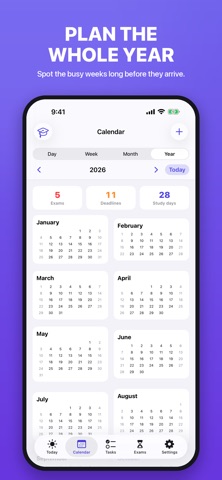
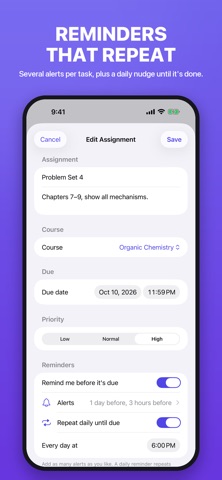
Class Schedule & Planner puts your timetable, your assignments and your exam countdowns in one student planner — built for the way school actually works, including the rotating Week A / Week B and block Day 1–Day N schedules that ordinary calendar apps get wrong. IMPORTANT: This is a paid app. A purchase is required to use it and there is no free version. The yearly plan starts with a 3-day free trial. NEW IN 1.1 • Calendar with Day, Week, Month and Year views • Study sessions and events — plan study time around what's due, even without a fixed schedule • Built-in to-do list with dates and reminders • Several reminders per assignment or exam, plus a daily nudge until it's done • Manage and delete courses in one place TODAY, AT A GLANCE • Your next classes with times, rooms and instructors • Everything due in the next 7 days • A live countdown to your closest exam • See instantly whether today is Week A, Week B, or Day 3 of the cycle A TIMETABLE THAT FITS YOUR SCHOOL • Weekly — the same classes every week • Rotating A/B — Week A and Week B alternate automatically • Block / Day cycle — Day 1 to Day N, and it can skip weekends • A colour-coded week grid you can actually read • Room, instructor and email details on every course ASSIGNMENT TRACKER • Homework, essays, problem sets and lab reports • Due dates, priorities and per-course filters • Grouped into Overdue, Today, Next 7 days and Later • Tick it off in a single tap EXAM COUNTDOWNS • A live day counter for every exam • Date, time, room and duration • The countdown turns urgent as the day approaches REMINDERS • Before class starts — you choose how early • Before an assignment is due • Days before an exam • Scheduled entirely on your device WIDGETS • Home Screen and Lock Screen widgets • Today's classes and the assignment due soonest PRIVATE BY DESIGN • Works fully offline • No account, no sign-up, no ads, no tracking, no analytics • Your data never leaves your device PRICING (US dollars; equivalent local pricing applies in other regions) • Yearly — $11.99 per year, auto-renewing. Begins with a 3-day free trial. Works out to $1.00 per month. • Monthly — $2.99 per month, auto-renewing. • Lifetime — $19.99, a one-time purchase. Nothing renews. Payment is charged to your Apple Account at confirmation of purchase. Subscriptions renew automatically unless auto-renew is turned off at least 24 hours before the end of the current period. Your account is charged for renewal within 24 hours prior to the end of the current period. You can manage your subscription and turn off auto-renew in your Apple Account settings after purchase. If you do not cancel the 3-day free trial at least 24 hours before it ends, it converts automatically into a paid yearly subscription. Any unused portion of a free trial is forfeited when you buy a subscription. Terms of Use (EULA): https://www.apple.com/legal/internet-services/itunes/dev/stdeula/ Privacy Policy: https://joykhansayan1.github.io/class-schedule-planner/privacy.html Support: https://joykhansayan1.github.io/class-schedule-planner/support.html
Screenshots