Money Manager: Budget & Profit
Musacan Cigirgan

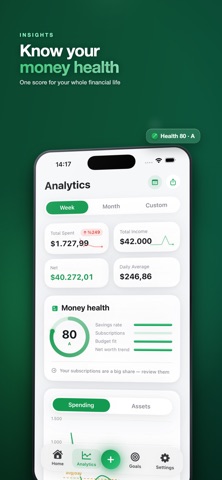
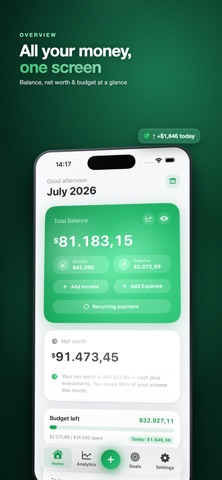
Money Manager helps you understand your money and grow it — without giving up your privacy. Everything you enter stays on your device. TRACK EVERY DOLLAR • Log income and expenses in seconds with a fast keypad • Organize with categories and set a monthly budget • See exactly where your money goes with clean charts CHOOSE YOUR CURRENCY • 53 currencies supported, including Sri Lankan Rupee (LKR) • Pick yours during setup or change it anytime in Settings • Currency names appear in your own language INVESTMENTS IN YOUR CURRENCY • Stocks (US & Borsa İstanbul), Turkish mutual funds (TEFAS), gold and silver • Live prices, shown in your own currency — a foreign user sees dollars, a Turkish user sees lira • Portfolio value, profit/loss and 30-day price history for each asset • Set savings goals and watch your progress • Track subscriptions and bills with reminders; add them to your calendar SMARTER WITH PREMIUM • Cash-flow forecast & safe-to-spend • Subscription radar & price-hike alerts • Smart alerts on unusual spending • Money health score • Unlimited goals & investments, category budgets, receipt photos, no ads PRIVACY FIRST • No account, no sign-up • Your financial data never leaves your device • Lock the app with Face ID / Touch ID SUBSCRIPTION Money Manager Premium is available as a weekly, monthly or yearly auto-renewing subscription. Payment is charged to your Apple Account. Subscriptions renew automatically unless canceled at least 24 hours before the end of the period. Manage or cancel anytime in Settings → Apple ID → Subscriptions. Terms of Use (EULA): https://www.apple.com/legal/internet-services/itunes/dev/stdeula/ Privacy Policy: https://egeaccount123.github.io/moneymanager/privacy.html
Screenshots