Iterum: Words in Context
Kseniia Snitko

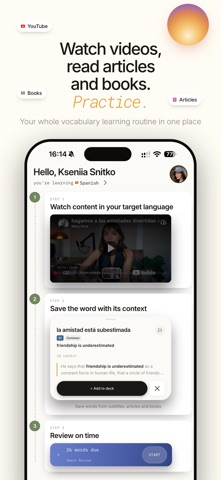
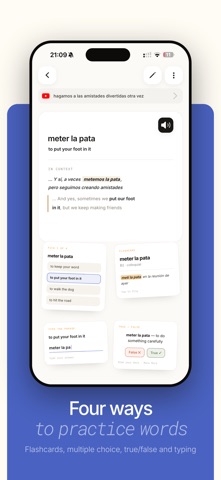
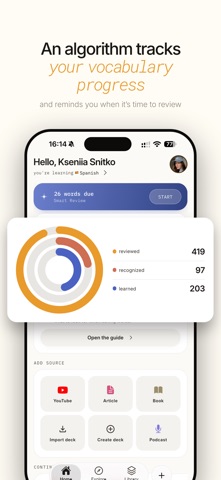
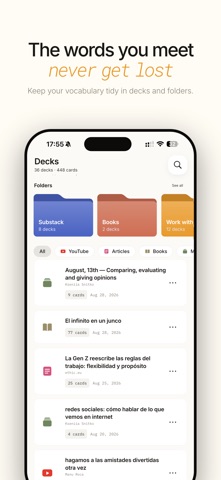
Don't wait for the highest level to watch and read content in the original. Paste a YouTube or article link, or open an EPUB book. Tap an unfamiliar word or phrase — and get a translation for that exact sentence, in context. The word is saved into a deck from that source, with a tappable link back to where it was saved from. WHERE YOUR VOCABULARY COMES FROM • YouTube — translate words straight from the synced subtitles • Articles — paste a link and read in the app • EPUB books — a handy reader with font settings: typefaces and sizes • Your own decks — created by hand or pasted in from a ready-made list • Explore — ready-made sets of English words and fixed phrases by level (B1–C2) and topic TRANSLATION THAT TAKES CONTEXT INTO ACCOUNT • The meaning is matched to the sentence the word appeared in • CEFR level and frequency, so you don't learn what you don't need • Collocations and fixed phrases are translated as whole expressions FIVE TRAINERS — FROM RECOGNITION TO RECALL • Flashcards — the word, with its definition on the back • Multiple choice — one right answer out of four • True/false — judge the statement • Written — type the answer from memory • Match — pair terms with meanings CONTEXT, NOT ENDLESS LISTS Just sitting down and learning 500 words is not adaptive for memory and perception. By contrast, in Iterum vocabulary arrives in small batches tied to their source, so at review time the context comes back with the word. Decks stay grouped by source instead of merging into one list. Folders let you mix several sources when you need a wider range. SMART REVIEW — REVIEWING WITHOUT PLANNING (ADVANCED) Most systems ask you to rate how well you know a word. Iterum delegates that rating to a formula. It reads what actually happened — whether you recognize the word or type it out, in which direction, how accurately and how long it took — and sets the next review from that. Confident answers move further away, uncertain ones come back sooner. Progress is three nested rings: Reviewed, Recognized, Learned. A word becomes Learned only after you produce it in both directions across several sessions on different days. BUILT TO KEEP YOUR VOCABULARY IN ORDER • Works offline — cards and review history stay on your device • Syncs with your account, your tablet and your next phone • Reminders at a time that suits you • A progress screen showing where every word stands • Export your own cards to CSV; share a deck by link • No ads, no streaks, no mascots Study English, Spanish, French or Polish — the sources, trainers and review are the same. The ready-made Explore sets are available in English for now. More ready-made sets in other languages are coming. FREE AND ADVANCED The free plan is a full app, not a demo: new sources every month, all five trainers with no round limit, AI translation in context, your own decks and folders, reminders and the free Explore sets. Iterum Advanced adds: • Unlimited sources — articles, videos and books • Smart Review — an algorithmic review schedule and the full progress rings • Folder study — learn whole topics, not just single decks • A higher monthly AI translation allowance and ready-made sets of English fixed phrases SUBSCRIPTION INFORMATION Iterum Advanced is an auto-renewable subscription, monthly (1 month) or annual (1 year). Prices for your region are shown in the app before you confirm. New subscribers get a free trial week; after that the subscription renews automatically unless auto-renewal is turned off at least 24 hours before the end of the current period. Payment is charged to your Apple Account on confirmation. You can manage or cancel the subscription at any time in your Apple Account settings. After cancelling, your decks and progress remain — the free plan keeps working. Privacy Policy: https://www.iterum.space/privacy Terms of Use: https://www.iterum.space/terms Support: kseniia@iterum.space
Screenshots