Calorie Counter: WOMP
Denis Shchennikov

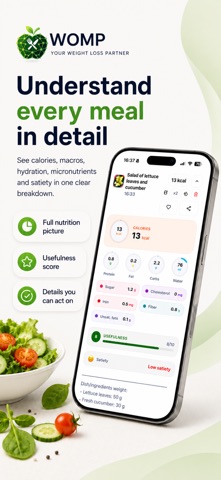
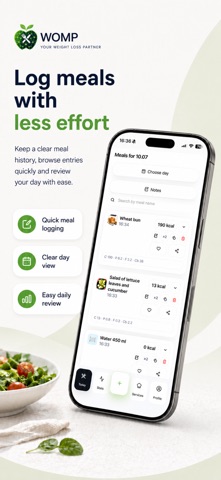
WOMP is a free calorie counter and macro tracker with AI photo analysis. Keep a food diary, track nutrition and weight, and create a weekly meal plan with recipes and a shopping list. Free AI features have usage limits — no subscription required. AI FOOD SCANNER: CALORIES AND MACROS Snap a photo of your meal. WOMP estimates calories, protein, fat and carbs, then adds the meal to your food log. Use the barcode scanner for packaged foods, describe a meal in text, log it by voice or choose a saved meal. Spend less time searching for individual ingredients. Review the result and edit portions or ingredients when needed. You stay in control of your food log. A FOOD DIARY THAT SHOWS THE WHOLE DAY Keep your calorie tracking and nutrition goals in one place. WOMP shows calories, macros, sugar, fiber and other nutrition values for your meals and daily totals. • See your daily calorie target and remaining allowance. • Track protein, fat and carbs throughout the day. • Follow your calorie deficit plan for weight loss, or track maintenance and weight gain goals. • Save familiar meals to log them again. See what you have already eaten, what may be missing and how your next meal could fit into your day. WEEKLY MEAL PLANNER FOR REAL LIFE Plan what to eat, not just what you already ate. WOMP builds a 7-day meal plan with meals, portions, estimated calories and macros, recipes and one combined grocery list. Tailor your plan to: • omnivore, vegetarian, vegan or pescatarian preferences; • household size and children's ages; • allergies, excluded foods and favorite cuisines; • balanced eating, more protein or fiber, or less added sugar; • cooking time, school lunches and meals for work; • refrigeration, reheating and your own requests. Replace a meal, repeat a day you enjoyed or adjust the plan when your routine changes. Plan for yourself or your family without starting from a blank page every evening. AN AI NUTRITION ASSISTANT WITH CONTEXT Ask what to have for dinner, how to add more protein, what to order at a restaurant or what to focus on tomorrow. WOMP uses your goal, food diary and recent meals to provide relevant suggestions. You do not have to explain your entire day each time you ask a question. DAILY REPORTS, WEIGHT TRACKING AND FORECASTS Review daily and weekly nutrition reports, log your weight and follow your progress. Explore possible reasons for a weight plateau using your recorded data. Progress forecasts show possible scenarios, not guaranteed results or a promised date to reach your goal. Use your daily review and next-day plan to decide what to work on next. WATER, ACTIVITY AND HABITS Log water and follow your hydration goal. Connect Apple Health to view steps, active calories and sleep, or record activity manually. Apple Health access requires your permission. WOMP also includes alcohol tracking, alcohol-free streaks and achievements. Keep food, movement and daily habits together instead of switching between separate trackers. FREE TO USE, WITH OPTIONAL PREMIUM Start with free food tracking and AI tools within the included usage limits. Current limits for analyses and other actions are shown in the app. No subscription is required for everyday use. Need more analyses? WOMP Premium increases your limits. Included features, plan details, prices and terms are shown before purchase. Manage or cancel your subscription in your Apple Account settings. IMPORTANT Photo analysis, calorie counts, nutrition values, meal plans, forecasts and guidance are estimates for general wellness and educational purposes. Check ingredients and product labels, especially if you have allergies. WOMP is not a medical device and does not replace advice or care from a qualified healthcare professional. Privacy Policy: https://womp.pro/privacy.html Terms of Use: https://womp.pro/terms.html Support: support@womp.pro
Screenshots