Headroom by Kyle Zantos
Kyle Zantos

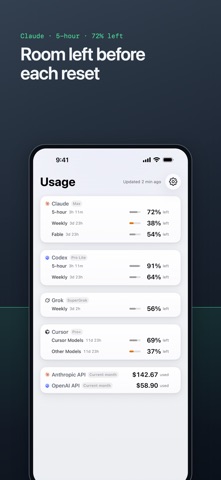
Headroom for Mac reads Claude, Codex, Grok and Cursor plan usage for accounts signed in through their official tools. This app shows the Mac’s readings on iPhone and iPad through your iCloud account. Each account has its own rows, with the account names you chose on your Mac. Rows show the percentage left and a short countdown to reset, such as 3d 23h. Rolling limits include 5-hour and weekly windows, plus model limits such as Claude’s Weekly (Fable). Grok shows a billing-period pool. Cursor separates Cursor Models and Other Models. Codex’s plan capsule shows banked resets when available. A number turns red when 15% or less is left. If you track API spend on the Mac, Anthropic, OpenAI and xAI spend appears below the plans for the current period. Home Screen widgets come in small, medium and large. Choose Nested Meter, Vessel Hero, Tightest First or Liquid Level in Edit Widget. Color can stay on or appear only when a limit runs low. Widgets follow the providers selected on your Mac and each provider’s main account. Lock Screen widgets show usage in circular, rectangular and inline layouts. Choose a style and provider in Edit Widget. The app follows your Mac’s meter style, with a phone override in Settings. On iPad, provider cards fill the width in columns. The app shows when your Mac last read the numbers. Siri and Shortcuts answer from the latest synced reading and include its age. Pull down on Usage to ask your Mac to check again. New readings appear after the Mac has checked and iCloud has synced them. Your iCloud summary contains account names you chose, plan names, usage, reset times, API spend, display choices, and random device IDs. Pull-to-refresh also sends check requests through iCloud. Passwords, sign-in tokens and API keys stay on the Mac. The summary uses iCloud key-value storage, which is not end-to-end encrypted. Read the privacy policy at headroom.zantos.co/privacy. To show your own usage, run Headroom 1.5 on your Mac, sign in to the same Apple Account on both devices, and turn on Sync usage to iPhone in the Mac app. Provider sign-ins stay on the Mac. Explore Demo lets you try the app and widgets with sample readings before setting up the Mac app. Get Headroom for Mac at headroom.zantos.co. Headroom is not affiliated with or endorsed by Anthropic, OpenAI, xAI or Anysphere.
Screenshots