Dynamic Lyrics: Car Widget
Vitalii Voloshyn

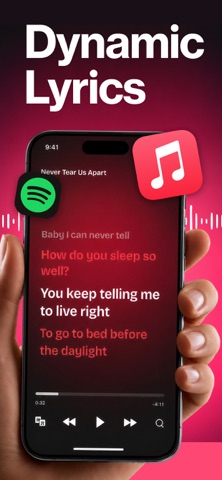
How do I see song lyrics on my car screen while driving? Can I display real-time synced lyrics on CarPlay? Dynamic Lyrics connects to your car display and shows perfectly timed lyrics for every song you play — turning your daily commute, road trips, and carpools into a karaoke-ready music experience. The app keeps lyrics synchronized with your music in real time so you never miss a word — perfect for sing-alongs, learning new songs, or enjoying music more deeply behind the wheel. HOW IT WORKS Once your phone is connected to the car, the app detects the currently playing track from Apple Music, Spotify, or other streaming services and retrieves time-stamped lyric data. As the song plays, it highlights each line in sync with the audio — smoothly, without lag. The interface is built for glance-readability with large fonts and high contrast, so you can follow along without taking your eyes off the road. It runs in the foreground and does not interfere with navigation or calls. KEY FEATURES Real-Time Lyric Sync — Lyrics match the exact moment in the song using time-stamped data, so every word appears precisely when it is sung. Accurate for fast rap verses and slow ballads alike. Car-Screen Optimized Layout — Large, bold, high-contrast text designed for quick glances. The current line stays centered and prominent so you can read it in under a second. Works with Multiple Music Services — Supports Apple Music, Spotify and other major platforms. It detects your service and pulls lyrics automatically. Offline Lyric Cache — Played songs are stored locally so lyrics load instantly next time, even with weak signal in tunnels or rural areas. WHO USES THIS APP Commuters who want to make 30–90 minutes of daily driving more enjoyable. Parents turning school runs into family karaoke. Road trippers staying energized on long highways. Music learners memorizing words and meaning. Carpools and rideshare drivers creating fun group sing-alongs. HOW TO GET STARTED 1. Download and open the app on your iPhone 2. Connect to your car via CarPlay, Bluetooth, or USB 3. Play a song in your preferred music app 4. Launch Dynamic Lyrics — it detects the track and shows synced lyrics on your car screen 5. Adjust text size and color for readability Tip: Enable automatic launch and pre-download lyrics on WiFi for smooth playback in low-signal areas. SUBSCRIPTION Annual Plan: $19.99/year — less than $2/month for unlimited lyric access and startup sound customization. Payment is charged to your iTunes Account at confirmation of purchase. Subscription auto-renews unless auto-renew is turned off at least 24 hours before the end of the current period. Your account is charged for renewal within 24 hours before the period ends. Manage or cancel anytime in your iTunes Account settings. Any unused portion of a free trial is forfeited when you purchase a subscription. DISCLAIMER This app is an entertainment and music enhancement tool for personal use while driving. It is not affiliated with Apple CarPlay, Spotify, Apple Music All trademarks are the property of their respective owners. Lyric accuracy depends on third-party databases and may vary by song and region. Always prioritize safe driving. Privacy Policy: https://getdynamiclyrics.com/privacy Terms of Use: https://getdynamiclyrics.com/terms
Screenshots