dotMux easy SSH with tmux
Free Tomorrow

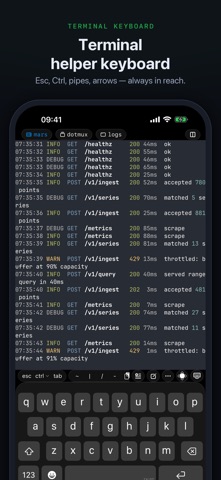
Stop fighting tmux on a touchscreen. dotMux speaks tmux control mode natively and rebuilds your remote workspace as real iOS UI — the way iTerm2 does on the Mac. Windows and panes become native tabs and views you drive by touch. NATIVE tmux, NOT raw text - Remote tmux windows become native tabs. - Every pane becomes a native view — focused full-screen on iPhone, true side-by-side splits on iPad. - Split, resize, and close panes from the app — pane menu, long-press, drag the divider, or keyboard shortcuts. - The window and pane pickers render your real terminals, live: pick a window by what's in it, not by its name. - Select and copy text with native handles; tap links in the terminal to open them. - If a host has no tmux, dotMux falls back gracefully to a plain terminal. EVERY HOST AT ONCE - Connect to as many hosts as you like at once. Leaving a terminal doesn't disconnect it — work keeps running on every host you have open. - The host list is the connection switcher: live hosts marked where you already look, one tap away. - Group hosts into folders; each folder shows what's connected inside it. - Forward a remote port over SSH and open your server's web UI inside dotMux. REAL SSH, DONE RIGHT - Password and public-key authentication. - Import your ed25519 or ECDSA (P-256) keys by paste or from Files — passphrase-protected keys included. - Or generate a key in the Secure Enclave: non-exportable, signed in-chip, never leaving the device. - Review and forget trusted host keys. - Connect directly from your device to your own servers. No middleman, no developer backend. PICK UP WHERE YOU LEFT OFF - The session picker lists every tmux session on the host and marks the ones already attached. - Switch sessions in place, or create named ones on the fly. - iOS suspended the app? Jobs keep running on the server, and dotMux re-attaches and rebuilds your tabs and panes when you come back. A KEYBOARD BUILT FOR TERMINALS - A helper bar with the keys terminals actually need: Esc, Ctrl, Tab and more. - Fully customizable: add, remove, and reorder every key — F-keys, Ctrl combos, arrows, even your own text. - Snippets: save commands globally or per host and run them again without typing them. - A multi-line composer for drafting long commands and agent prompts, sent in one go. - A drag-pad arrow joystick with press-and-hold repeat, sticky modifiers, and a hide-to-floating-dock control when you want the screen back. - Paste images from your clipboard — annotate them first if you like; dotMux uploads them and pastes the path (built for Claude Code). MAKE IT YOURS - Terminal fonts: JetBrains Mono, Fira Code, Hack, IBM Plex Mono and more. - Color themes with live preview: Dracula, Nord, Solarized, Gruvbox, Tokyo Night and more — or import any Ghostty or iTerm2 theme from a file or URL. - Pinch to zoom with a live cols × rows readout; keep the screen awake while connected. AUTOMATE IT - Shortcuts support: connect to a host, send a command, read the output back. Unattended runs, enabled per credential, for automations that can't stop to ask for Face ID. SECURITY THAT STAYS ON YOUR DEVICE - Face ID app-lock, plus a second Face ID gate per credential, with a short configurable grace period. - Credentials live in the Keychain and Secure Enclave, bound to this device — never synced to iCloud, never sent anywhere. - A privacy cover hides the terminal in the app switcher. - dotMux collects no data. No analytics, no tracking, no ads, no account, no sign-up. MADE FOR iPad TOO - One universal app for iPhone and iPad. - Open hosts side by side in multiple windows; built for hardware keyboard and trackpad. PRICING - Free: save and connect to one host, fully featured. - Unlimited Hosts: a one-time $1.99 purchase to save as many servers as you like. No subscription. Restore Purchases supported. Note: RSA keys are not supported (modern OpenSSH disables the SHA-1 ssh-rsa signature). Use ed25519, ECDSA (P-256), or a Secure Enclave key.
Screenshots