Screen Off Recorder
Wujie Yibang (fuzhou) Software Technology Co., Ltd

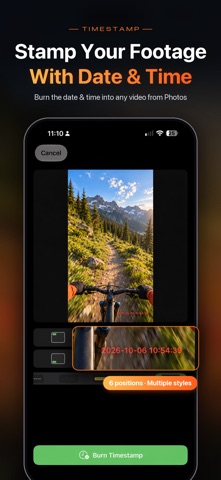
Screen Off Recorder is a native iOS camera app built for outdoor POV and long takes. Mount your iPhone and keep recording through hikes, runs, ski days, and road trips—or set it on a desk tripod for classes and meetings. It supports front+back dual camera, Apple Watch remote control, and album timestamps. THE CORE IDEA While recording, tap Screen Off: a near-black full-screen overlay lowers brightness to save power, stay cool, and prevent accidental taps. Recording continues as long as the app stays in the foreground. Tap to wake the controls, then Stop & Save to Photos or discard the clip. A SIMPLER CAMERA SCREEN (1.7) • Turn dual cam on or off with one tap at the top right; long-press it for quick layout, aspect, and border options • The Adjust panel at the top right holds every shooting setting: quality, frame rate, stabilization, and default lens in single cam; layout, aspect, border, and frame rate in dual cam—with a live preview above • The album button at the bottom left includes tools to timestamp videos from Photos; while recording, it becomes the Screen Off button • Faster, more reliable switching between single and dual cam DUAL CAMERA • Record front and back cameras at once into a single video in Photos—capture the view and your reaction together • Picture-in-picture: drag the inset, resize with the corner handle or a pinch; aspects 16:9 / 1:1 / 4:5 / 5:4 / 9:16; position and size are remembered • Long-edge split: top/bottom in portrait, left/right in landscape • Border styles: None, Thin white, Thick white, Black, Soft white • Tap the inset or the bottom-right button to swap views; Apple Watch preview follows the current primary view • Requires iPhone XS/XR or later (A12+), or iPad with A12X or later. Stabilization and lens switching are unavailable in dual-cam mode DYNAMIC TIMESTAMP • Open the album button at the bottom left, pick a video, and burn in a clock that advances with the capture time • Six positions with live preview; multiple styles (classic, outline, yellow, cyan, red, and more) • Saves a new video and keeps the original; HDR / Dolby Vision sources export as SDR LONG TAKES, LESS WORRY • Dark Screen Off overlay; the recording indicator stays visible • Auto Save & Continue (off by default): every 5/10/15/30/60 minutes, save the current clip to Photos and immediately continue • Stop & Save ends the session after saving the current clip; Discard drops only the unsaved segment APPLE WATCH REMOTE • Start/stop and save, preview the shot, enter Screen Off, and adjust settings from your wrist • Live preview mirrors your iPhone framing (unavailable while recording); follows the primary view in dual cam • The Watch app installs with the iPhone app HOW IT WORKS • Native Swift + AVFoundation—not a WebView shell • Single cam: frame rates, 1080p/4K, Ultra Wide / Wide / Telephoto (device-dependent), zoom, tap to focus, motion stabilization (best at 1080p + Ultra Wide) • Tap Screen Off while recording, or let it turn on ~3 seconds after you start • Orientation follows how you hold the phone PRIVACY & DATA • No account required • No upload to our servers—videos are saved to your on-device Photos library • iCloud Photos sync, if enabled, is managed by Apple IMPORTANT NOTES • Screen Off is an in-app blackout—not recording after the side-button hardware lock. Keep the app in the foreground. • Dual cam uses more power and generates more heat than single cam; watch battery and temperature on long takes. • Timestamps are on-device post-processing, not burned in live while recording. • Auto-save creates separate clips with a brief gap between them. • Watch preview and instant remote control require the iPhone app in the foreground. • Green/orange privacy indicators while recording are normal on iOS. • Record only where you have permission and follow local laws. Screen Off Recorder—you just go. The camera keeps rolling.
Screenshots