MyRoster — Crew Schedule
Damiano Miazzi

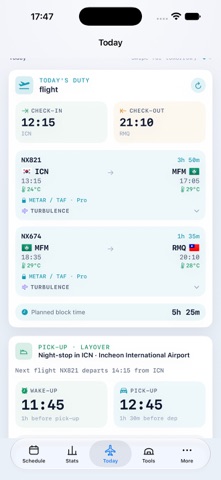
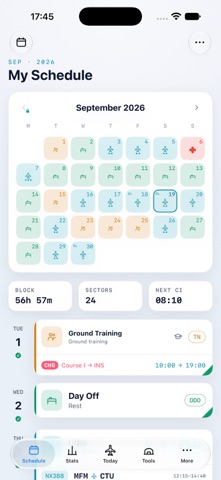
MyRoster turns the roster PDF your airline publishes into a clean, navigable schedule on your iPhone. Built by a working airline pilot, it reads the formats real rosters use: monthly schedules, weekly amendments, flight duties, ground duties, simulator sessions, standby, training and days off. IMPORT YOUR ROSTER • Open a roster PDF from Files, Mail or the share sheet and MyRoster reads it line by line: duties, sectors, check-in and check-out times, routes and crew. • Import a newer version of the same month and MyRoster highlights what changed. • Crew of supported operators can also download their roster from inside the app, using the portal access their employer already gave them. SEE YOUR MONTH AT A GLANCE • Monthly calendar with colour-coded duties. • Today view with check-in, sectors, block time, pick-up and wake-up times, and destination weather. • Full duty detail for every day, including layovers. • Home Screen widget and Live Activity for the duty in progress. STAY AHEAD OF YOUR DUTY • Duty reminders and real wake-up alarms timed from your check-in or pick-up. • One-tap sync to the iOS Calendar, updated when your roster changes. • Statistics for block hours, sectors, destinations and the colleagues you fly with. • Flight log with export to LogTen. • Annual leave planner and salary estimate. • Fatigue awareness: a duty-based alertness estimate that can optionally read your sleep from Apple Health, with your permission. Health data stays on your device. This is an awareness aid only. It is not a certified fatigue risk management system and must never be used for operational or medical decisions. WITH COLLEAGUES, IF YOU CHOOSE Sharing is off by default. Turn it on to find crew on the same duty, follow friends' rosters and post trip-trade offers within your own company. YOUR DATA Your roster is stored on your device and backed up to your private MyRoster account so it follows you to a new phone. You can delete your account and its cloud data from inside the app at any time. INDEPENDENT TOOL MyRoster is not affiliated with, endorsed by, or sponsored by any airline. It helps you read the schedule your employer publishes. Always check anything important against your airline's official sources. MYROSTER PRO MyRoster is free to use for importing and viewing your current month. MyRoster Pro is an optional auto-renewable monthly subscription that unlocks your full schedule history, calendar and LogTen export, statistics, reminders and alarms, salary and leave planning, fatigue tools, crew tools, backup and restore, and online import for any month. New subscribers get a 3-day free trial. After the trial the subscription renews automatically at the monthly price unless it is cancelled at least 24 hours before the trial ends. Payment is charged to your Apple Account at confirmation of purchase. The subscription renews automatically unless cancelled at least 24 hours before the end of the current period. Manage or cancel it in your Apple Account settings. Terms of Use: https://myroster-privacy.pages.dev/myroster/terms Privacy Policy: https://myroster-privacy.pages.dev/myroster/privacy
Screenshots