Synopsule
Sunny Nagra

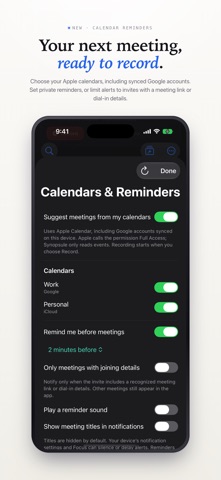
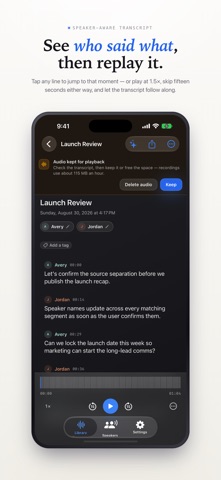
Synopsule helps you record a conversation, read who said what, and return to the details later. Record on iPhone with a live transcript and timestamped notes, or record on Apple Watch and transfer the recording to your paired iPhone for local processing. TRANSCRIPTION ON YOUR iPHONE Whisper transcribes audio locally once your chosen speech model is installed. Review speaker labels and saved-voice matches after analysis. Voiceprints stay on your iPhone. Adaptive layouts keep your library, transcript and recording controls easy to read. NOTES YOU CAN REVIEW Jot notes while recording or reading and return to their timestamps. After analysis, Add context can suggest additions from nearby transcript passages and files you attach. Your original note stays intact. Inspect the quotes, then Keep, Edit or Discard the suggestion. Only kept, current context is included in transcript exports. FILES AND QUESTIONS Attach readable PDF, Markdown or text files to a recording or its meeting series. Ask questions across saved meetings and attached text, with source quotes you can open and check. Library search also finds notes, labeled flags and attached text. Search on this device in Settings offers an optional 165 MB download to find related wording; keyword search still works without it. AI ON YOUR TERMS Add context, questions and summaries use the AI option you choose. Choose Apple Intelligence on supported devices, your own OpenAI, Anthropic or Google Gemini key, or optional Synopsule Pro. Apple Intelligence supports summaries, answers and note context on-device, with a smaller context window for long sources. Pro provides cloud AI without a key to manage. Cloud AI names the provider and asks before sending selected transcript, note or attached-file text. Recorded audio is never sent to an AI provider. Reset AI consent in Settings whenever you want. Automatic summaries are a setting you control. FIND WHAT MATTERED Search your saved library, label important moments and revisit action items. Optional Meeting context during recording quotes earlier saved meetings using local search. CALENDAR REMINDERS Choose calendars configured in Apple Calendar, including Google accounts. Set optional reminders and title privacy, mute recurring series, and choose a meeting title when starting a recording. Recording starts only when you choose Record. YOUR LIBRARY, YOUR CHOICE Choose whether to keep audio for playback and re-analysis. Transcripts and notes remain saved when audio is deleted. Edit text and speaker labels, export the parts you choose, or create a library archive to move recordings between devices. Archives merge with an existing library. No app account is required. Product analytics not linked to your identity can be disabled in Settings. Recorded audio, transcript text, notes and attached text are excluded from analytics. SYNOPSULE PRO (OPTIONAL) Pro has monthly and yearly subscriptions. Subscriptions auto-renew until cancelled; manage them in your Apple Account subscription settings. Transcription and speaker separation run locally without a Pro subscription. On Apple Watch, start, pause or resume a recording, add markers, and review transfers to your paired iPhone. Watch recordings stay on your Watch until transferred. Export Markdown, Word, PDF, plain text, SRT/VTT subtitles or interactive HTML. Send text to Apple Notes or Obsidian. Requires iOS 17 or later. Apple Watch recording requires watchOS 26 or later and a paired iPhone. Apple Intelligence requires supported hardware, iOS 26 or later and Apple Intelligence enabled. Privacy: https://synopsule.com/privacy/ Terms: https://www.apple.com/legal/internet-services/itunes/dev/stdeula/
Screenshots