ArcLog
GAVIN NICHOLAS WATERS

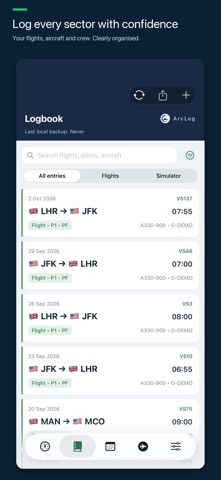
ArcLog is a modern pilot logbook for iPhone and iPad, designed for airline, commercial and general aviation pilots. One purchase, no subscriptions A single upfront payment, with no monthly fees or recurring subscription required. Record complete flights, incomplete sectors while airborne and simulator sessions without forcing invented times. Keep routes, aircraft, crew, block and flight times, roles and functions, take-offs, landings, approaches, night time and remarks in one clear workflow. Your flying, organised • Fast flight and simulator entry, with filters for flights, simulator sessions or both • IATA and ICAO airport identification, worldwide lookup and custom airfields • Automatic night-time calculation with manual override • Searchable aircraft, airport and pilot directories, with sorting and favourites for aircraft and pilots • Aircraft category icons and detailed aircraft records • Merge duplicate pilots and choose their preferred name • Per-flight pilot roles, functions and training records • Smart Totals, custom limits, currency tracking and visual summaries • Contributing-flight breakdowns for supported totals and limits Bring your records with you • Import completed flights and optional simulator sessions from compatible eCrew Pilot Logbook/JAR-FCL CSV reports • Review entries, source totals and duplicate checks before adding them • Import UTC off/on-block times without inventing missing flight numbers or take-off/landing clocks • Keep existing logbook entries unchanged Exports your way • Professional PDF and Excel logbook exports • A choice of PDF layouts, colour palettes and paper sizes • Flexible export date ranges and cumulative totals Connected when you choose • Optional iCloud sync across your iPhone and iPad using the same Apple Account • Optional iCloud Drive JSON backups and local backup/restore • eCrew CSV roster import (beta)* • Roster calendar sync, including separate check-in and flight events • Private, invitation-based Shared Rosters with friends and colleagues* • A clear day-by-day shared roster, with your own sharing controls kept together Designed for your devices • A consistent Atlantic navy-and-green design • Light, dark and automatic appearance • Adaptive iPhone and iPad layouts • Side-by-side browsing and settings on larger displays * To share your own roster, first import a supported eCrew CSV roster. Roster import is in beta and currently tested with Virgin Atlantic only. You can accept an invitation and view a colleague’s shared roster without uploading your own. Both people need ArcLog and iCloud. For other airlines or roster formats, contact arclog.support@gmail.com with a redacted sample CSV where possible. Private by design No separate ArcLog account, advertising, analytics or tracking. Your working logbook is stored locally. Optional iCloud sync uses your Apple Account; optional backups are saved to your iCloud Drive. Shared Rosters shares limited roster details only with people you invite—not your private logbook, crew records, documents or flight totals. Sharing updates requires an internet connection and ArcLog to be opened. Pilots remain responsible for checking imported, calculated and exported records and ensuring their logbook meets applicable authority, employer and licensing requirements.
Screenshots