SSH Client – Terminal & SFTP
HANSIFY TECHNOLOGIES

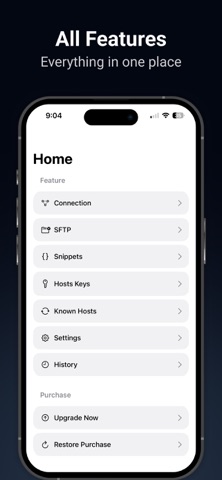
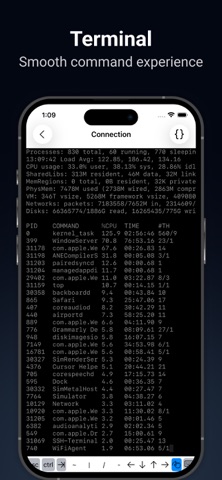
SSH into Linux servers from iPhone or iPad. Connect with a password or SSH key, browse files over SFTP, and keep hosts in sync with iCloud. SSH Client – Terminal & SFTP is built for developers, sysadmins, and anyone who needs reliable remote access on the go. CONNECT IN SECONDS • Save hosts with an alias, hostname, port, and username • Sign in with a password or SSH key • Open a full SSH terminal session from your saved connections • Choose a colour theme (Midnight, Light, Matrix, Solarised) and font size SFTP FILE TRANSFER • Browse remote directories • Download files to your device • Upload from the Files app • Show or hide hidden files KEYS AND SECURITY • Generate ed25519, RSA, or ECDSA keys • Create Secure Enclave keys on device • Import existing private keys • Manage known hosts • Store passwords in the Keychain FASTER WORKFLOWS • Save and reuse command snippets • Keep connection history • Sync hosts and data with iCloud across your Apple devices WHO IT’S FOR • Linux, Ubuntu, and Unix servers • VPS and cloud hosts • Raspberry Pi and home labs • Day-to-day remote admin from iPhone or iPad Try it with one saved host. Upgrade to Pro when you need more servers. Pro is available as weekly, monthly, or yearly auto-renewing subscriptions, or as a one-time Lifetime purchase. Prices are shown in the app and on the App Store and may vary by region. Payment is charged to your Apple ID account. Subscriptions renew automatically unless canceled at least 24 hours before the end of the current period. Manage or cancel anytime in Settings > Apple ID > Subscriptions. Deleting the app does not cancel a subscription. Privacy Policy: https://www.freeprivacypolicy.com/live/de501fa3-782a-48dd-b33f-83d8bc220c5c Terms of Use: https://www.privacypolicies.com/live/ec0062f6-bde6-4a8d-b665-9df7cf6f5d6e Support: help.app007@gmail.com Feel free to reach out with feedback or feature requests—we’re always improving the app.
Screenshots