Woodworking Calculator Asst.
小燕 陈

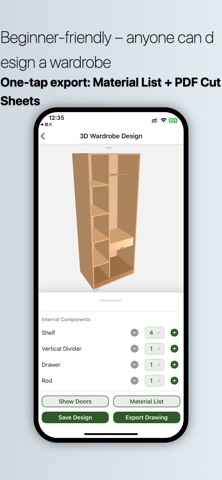
A Smart Assistant That Truly Understands Woodworking Whether you are a professional carpenter, custom furniture designer, or home renovation DIY enthusiast, "Woodworking Calculator Assistant" helps you say goodbye to tedious manual calculations and drawing. With 5 modules — 3D Wardrobe Design + Wine Rack Calculation + Geometry Calculator + Irregular Shape Drawing Tutorials + Utility Tools — all your on-site woodworking calculation and design challenges are solved in one place. Key Features I. 3D Wardrobe Design (Parametric Modeling, What You See Is What You Get) Enter cabinet dimensions (width/height/depth) and board thickness to generate an interactive 3D model in real time Supports standard single cabinets, wall-mounted cabinets, and corner cabinets Freely add shelves, drawers, and hanging rods; delete or reposition with one tap Door options: swing or sliding doors; adjustable number of doors Choose cabinet material and door color with real-time preview Hide doors to easily view internal structure Auto-generate material list: board specifications, quantities, and hardware counts at a glance Export PDF cutting sheets: A4 landscape cutting dimension table, ready to print or share Designs saved automatically; edit historical designs anytime II. Wine Rack Calculation (For Diamond / Rhombus Wine Cells) Enter total width, total height, board thickness, and number of cells Automatically calculates board cutting dimensions and inner diagonal sizes Color-coded assembly diagram with different colors for different boards Supports standard and half-cell wine rack modes III. Geometry Calculator (Common Woodworking Formulas) Triangle calculation (two sides and included angle → third side, angles, area) Circle calculation (radius → diameter, circumference, area) Arc calculation (radius + central angle → arc length, chord length, sector area) Regular polygon calculation (side length + number of sides → circumradius, area, perimeter) Ideal for layout marking, curved shapes, polygonal frames, and more IV. Irregular Shape Drawing Tutorials (Step-by-Step) Six categories: diamond ceiling, TV wall, tatami, grid division, cabinet door division, wine rack drawing Each step includes detailed text instructions + practical tips Built-in diagrams, easy for beginners to understand Suitable for on-site construction guidance or self-learning V. Utility Tools Unit converter: length (mm/cm/m/inches/feet), area, volume, one-tap conversion Decibel meter: real-time ambient noise measurement to evaluate on-site volume Compass: displays true north direction, assists with positioning and orientation Level: uses phone gyroscope to measure pitch and roll angles, calibrate furniture level VI. Clean, Ad-Free, Simple & Easy to Use Even beginners can design their own wardrobe Supports dark mode, eye-friendly for nighttime work No ads, focused on utility Local data storage, no internet required, works even on job sites without signal User Reviews (Selected) "I've been making wardrobes for over ten years. I used to draw by hand. Now with this app, clients understand the 3D effect at a glance, and the material list is automatically calculated, saving me half the time." – Carpenter Li "The wine rack calculation is so accurate. I used to miscalculate sizes and waste boards. Now I just enter the numbers and get the result, plus an assembly diagram. So convenient." – Foreman Wang "I renovated my own house. I used this app to design the wardrobe and had the carpenter follow it. The result looks exactly as I imagined, and I saved on design fees." – Homeowner Xiao Chen Support & Feedback We are committed to providing the most practical tools for woodworking professionals. If you have any suggestions or encounter any issues, please contact us via the "Feedback" option in the app. Every piece of your feedback helps us improve.
Screenshots