Pengesekken
Tor Inge Bjørsvik

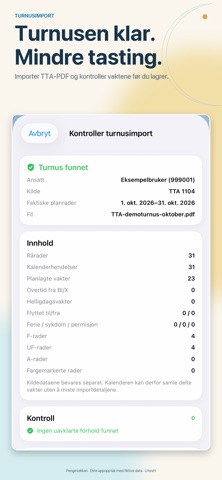
Pengesekken brings together shifts, overtime and estimated pay for Norwegian police personnel. See your shifts, understand calculations and find information to check. The app interface is in Norwegian Bokmål, including when using this listing. ROSTER AND CALENDAR • Import supported TTA roster PDFs or ICS files directly into the app. • View shifts in the calendar, create a recurring roster and compare it with an imported plan. • Review changes and overtime proposals before saving. Import and deletion support undo. • Share a roster image or ICS file, or transfer events to Apple Calendar. • Use monthly-calendar and next-shift Home Screen widgets. • Receive shift notifications and system alarms. System alarms require iOS 26 or later and separate permission. OVERTIME, PUBLIC HOLIDAYS AND STANDBY Record overtime and see estimated gross and net pay. Ordinary public-holiday shifts have a separate overview with hours, individual allowances and their estimated total. Record standby periods and call-outs, and use indicative rest-time and next-attendance suggestions. PAY BASED ON YOUR INFORMATION Enter annual salary, working hours, Norwegian tax-table or percentage withholding, and recurring allowances. Dated records support salary and deduction changes. Record hourly or daily instructor allowances independently of overtime. Enter practice-supervisor allowances in their own category. Pay settings include holiday-pay settlement and payment rules. Select a reduced-withholding month and optional summer exemption. Net estimates require tax information. See monthly earned and expected pay, and annual forecasts based on your entered roster and salary information. Track goals, salary development and purchasing power. Export a calculated monthly overview as a PDF clearly marked as an estimate. Forecasts depend on the periods and information you have entered. PAYSLIP CHECKING — BETA Import a supported payslip PDF locally or enter key amounts manually. Compare calculated and payslip amounts and their differences. See missing information, unknown items and other earning periods. This helps you investigate discrepancies; it does not guarantee correct pay or tax. HELP AND GUIDED SETUP Set up salary, tax, allowances, roster and widgets with the introduction. Searchable help and “Forstå lønn og tillegg” explain ten topics with time windows, examples and sources, including night, weekend and public-holiday work, converted time, compensatory time off and standby. The app does not track leave or compensatory-time balances. Choose light, dark or system appearance. Use optional app lock, personal work notes and backups with the date of your last export. TRIAL AND PREMIUM Premium is free for 21 days from recorded first use of the local installation. No payment starts automatically. Optional monthly and annual subscriptions are purchased through Apple. Price and billing period are shown before purchase. Subscriptions renew automatically until cancelled and can be managed in your Apple Account. After access expires, existing records and historical amounts remain readable. Help and backup remain available. Editing, new calculations and future pay forecasts require an active trial or Premium. AN INDEPENDENT PROJECT Salary, roster and document data are processed locally and are not sent to the developer's servers. Sharing, export and Apple device backups are optional. Apple handles purchases. Pengesekken is an ad-free project developed in the creator's spare time. Subscriptions support maintenance and development. It is not an official app of the Norwegian police or government. Calculations are indicative. Check results against your roster, payslip, local agreements and applicable rules. Contact: Addoapps@proton.me Privacy policy: https://somber-odometer-c6f.notion.site/Pengesekken-Privacy-Policy-349b5cefa9fe8099acbdcf70dbeb7adb Terms of Use: https://www.apple.com/legal/internet-services/itunes/dev/stdeula/
Screenshots