Tote: Grocery Shopping List
MVA Digital

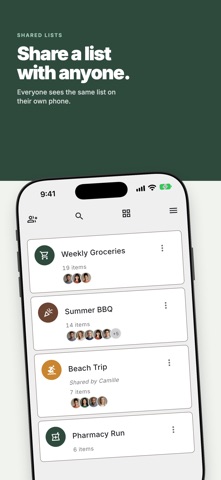
Tote is a shopping list app. Make a list, send a link or a QR code, and the people you invite see the same list. One person adds an item, and it appears on the other phones right away. You can start using Tote without an account. Sign in when you want to share a list or sync it between your own devices. WHAT TOTE DOES • Shared lists — Share a list with family or roommates. Everyone on it sees the same list. • Aisle order — Your aisles come in the same order as the aisles in your store. You set that order yourself, for each list. • Reusable lists — Checked items stay on the list, so you can use the same list again next week. • Shopping mode — A larger view for use in the store, with the screen kept on. Swipe an item right to check it off, or left to uncheck it. • Prices and budget — Add a price to an item and Tote keeps a running total as you shop. • Offline — Add and check off items with no signal. Tote syncs when the connection returns. • No ads — Tote shows no ads and does not sell your data. • Deleted lists — A deleted list stays in Recently Deleted for 30 days. TOTE+ You can share with one person for free — a partner or a friend — on as many of your lists as you want. Tote+ is a paid upgrade. It adds: • Unlimited collaborators — invite as many people to a list as you want. • Item photos — add a photo to an item, so the person shopping sees which product to buy. • Reusable share links — one invite link per list, instead of a new link for each person. Tote+ is a monthly or annual subscription, or a one-time lifetime purchase. Subscriptions renew until you cancel them. You can manage them in your Apple Account settings. Terms of Service: https://tote.mvadigital.ca/terms Privacy Policy: https://tote.mvadigital.ca/privacy
Screenshots